


TL;DR
A no-code MVP is the fastest, cheapest way most founders can put a working product in front of real users. You assemble the app visually on a platform like Bubble, FlutterFlow, or Webflow instead of hiring engineers, and you can be live in days for the price of a few subscriptions. It is the right call when your goal is to validate demand, not to scale.
The catch: no-code is a starting line, not a finish line. The shortcuts that get you live in a weekend become ceilings the moment you find traction. This guide covers what a no-code MVP actually is, the four ways to build one, the best tools for each product type, what it really costs and how long it takes, whether investors accept it, the mistakes that sink most attempts, and the exact signals that tell you it is time to move to custom code.
Key Takeaways
- A no-code MVP is the fastest, cheapest way most founders can put a working product in front of real users.
- You assemble the app visually on a platform like Bubble, FlutterFlow, or Webflow instead of hiring engineers.
- You can be live in days for the price of a few subscriptions.
- It is the right call when your goal is to validate demand, not to scale.
- No-code is a starting line, not a finish line; its shortcuts become ceilings once you find traction.
More data: sourced MVP cost and timeline ranges are in our MVP statistics for 2026.
What is a no-code MVP?
An MVP, or minimum viable product, is the smallest version of your product that lets real users do the one job your idea promises, so you can learn whether anyone actually wants it. A no-code MVP is that same first version, built on visual platforms instead of hand-written code.
Instead of an engineer typing out a database, API, and front end, you drag components onto a canvas, connect them to a built-in database, and wire up logic with point-and-click workflows. The platform generates and runs the underlying software for you.
The point is not to avoid code forever. It is to answer one question as cheaply and quickly as possible: do people want this enough to use it, pay for it, or sign up? No-code is a tool for buying that answer fast, and the speed is the whole value. Every week you save getting to a real user is a week of learning you would otherwise have spent guessing.
No-code MVP vs prototype vs proof of concept
Founders use these three terms interchangeably, and it costs them time. They are not the same thing, and confusing them leads to building the wrong artifact.
- A prototype is a non-functional mockup, often a clickable Figma design, used to test look, feel, and user flow. Nobody can actually use it to do a real task, and no real data moves through it.
- A proof of concept is a narrow technical test that answers one question: is this even possible to build? It is for the team, not for customers.
- An MVP is a real, working product, the smallest one that lets a real user complete the core job and that you can put in front of paying or signing-up customers.
A no-code MVP is firmly in the third category: a real product, not a polished mockup. The common mistake is to spend weeks perfecting a prototype nobody can use, or to call a clickable design an MVP and wonder why it produces no real validation. If users cannot actually do the job and you cannot measure whether they did, it is not an MVP yet.
The four ways to build an MVP: no-code, low-code, AI-built, and custom
"No-code versus custom" is the famous debate, but in 2026 there are really four ways to build a first version, and picking the right one is half the battle. Here is how they compare.
| Approach | What it is | Speed | You own the code? | Scales past validation? | Best when |
|---|---|---|---|---|---|
| No-code | Visual platforms (Bubble, Webflow, FlutterFlow) | Fastest | Usually no | To a ceiling | Non-technical founder validating standard logic |
| Low-code | Visual building plus custom code where needed | Fast | Partly | Further than no-code | You have some dev help and need custom pieces |
| AI-built | Prompt-to-code tools (Lovable, Bolt, v0, Cursor) | Very fast | Yes, but messy | Only after cleanup | You or a developer can review and harden the code |
| Custom | Engineers writing the codebase from scratch | Slowest upfront | Fully | As far as architecture allows | Complex core, regulated space, or scaling |
The two newcomers matter. Low-code sits between no-code and custom: you build visually but drop into real code for the parts the platform cannot handle, which pushes the ceiling higher at the cost of needing some engineering skill. AI-built tools, sometimes called vibe coding, generate a working app from a written prompt. They are astonishingly fast, but the code they produce is frequently insecure and hard to maintain, so it is closer to a very fast rough draft than a finished product. Treat AI-generated output as something a real engineer must review before it touches production traffic or sensitive data. We cover this approach in depth in vibe coding an MVP.
For most non-technical founders validating a standard idea, no-code is still the right first move. The rest of this guide focuses there, while being honest about when one of the other three serves you better.
When a no-code MVP is the right call
No-code is the smart choice more often than engineers like to admit. Reach for it when:
- You are validating, not scaling. Your goal is proof of demand, not a production system for ten thousand users.
- You are non-technical and have no co-founder who codes. No-code removes the single biggest blocker between you and a live product. (No-code is one of four paths, see all your options in our guide for non-technical founders.)
- Speed matters more than polish. A funding window, a competitor, or a seasonal moment means live this month beats perfect next quarter.
- Your logic is standard. Sign-up, profiles, listings, forms, dashboards, payments, and basic data flows are exactly what no-code does well.
- Budget is tight. You want to spend real money after demand is proven, not before.
If most of those describe you, building custom from day one is usually a waste of time and money. Validate first.
When a no-code MVP is the wrong call
No-code stops being the right tool when the thing that makes your product valuable is the thing no-code cannot do well. Skip it, or plan to outgrow it fast, when:
- Your core is technically complex. Real-time systems, heavy data processing, custom algorithms, AI pipelines, or anything genuinely novel under the hood.
- You are in a regulated industry. Fintech, healthtech, and similar fields have compliance and data-security needs that platform constraints make hard or impossible to meet.
- Performance is the product. If speed, scale, or reliability is your differentiator, a shared platform will fight you.
- You need deep integrations. Connections the platform does not support natively turn into brittle, expensive workarounds.
- You already have proven demand and funding. Building on a foundation you will rip out in six months is false economy.
The best no-code tools for an MVP in 2026
There is no single best tool, only the best tool for a given shape of product. Here is the quick map, followed by an honest read on each.
| Tool | Best for | Cost reality | Code ownership |
|---|---|---|---|
| Bubble | Logic-heavy web apps: SaaS, dashboards, marketplaces | Cheap to start, scales with usage | No exportable code |
| FlutterFlow | Native mobile apps for iOS and Android | Moderate, predictable | Exports real source code |
| Webflow | Marketing sites, landing pages, content products | Low to moderate | Exports clean HTML/CSS |
| Glide | Apps on top of a spreadsheet or Airtable | Very low | No |
| Softr | Client portals and internal tools on Airtable | Very low | No |
| Adalo | Simple consumer mobile and web apps | Low | No |
Bubble is the most powerful all-rounder for web apps with real logic. If your product has users, roles, a database, and workflows, Bubble can probably build it. The trade-offs are a real learning curve and the fact that you cannot export the underlying code, so a future migration means a rebuild rather than a lift-and-shift. See our dedicated Bubble MVP guide for when it fits and when to move to custom.
FlutterFlow is the strongest pick for native mobile MVPs. It compiles to real Flutter code that you can export and host yourself, which softens the lock-in that haunts most no-code tools. If your product lives on the App Store and Play Store, start here.
Webflow is unmatched for visual design and is the right tool for marketing sites, landing pages, and content-driven products. It is not built to carry complex application logic on its own, so founders often pair it with a tool like Airtable or a no-code backend for anything interactive. See our dedicated Webflow MVP guide for what it's great for and where Bubble fits instead.
Glide and Softr are the fastest path when your data already lives in a spreadsheet or Airtable. Glide is excellent for quick internal tools and simple apps, and Softr shines for client portals and membership sites. Both trade depth for speed, so they fit narrow, well-defined products rather than sprawling ones.
Adalo is easy to learn and good for straightforward consumer apps, though it hits limits as complexity grows. It is a fine choice for a simple first version where you value approachability over raw power.
Alongside these sit the AI app builders, Lovable, Bolt, and v0. They generate a working app from a prompt and are the fastest way to a clickable draft, especially for a developer who can refine the output. Just remember that speed is not the same as production-ready: generated code needs a security and quality review before real users and real data depend on it.
Which no-code approach fits your product type
The right tool depends less on popularity and more on the shape of what you are building. Match your product to the stack.
| Product type | Recommended no-code stack | Watch out for |
|---|---|---|
| SaaS web app | Bubble | Complex billing and permission logic can get unwieldy |
| Two-sided marketplace | Bubble, plus Stripe Connect for payouts | Trust, disputes, and payment splits are hard to fake |
| Native mobile app | FlutterFlow | Push, offline, and app-store review add real work |
| Internal tool or dashboard | Glide, Softr, or Retool | Outgrows simple tools once logic deepens |
| Marketing site or content product | Webflow | Needs a backend for anything interactive |
| AI-powered app | An AI builder plus a no-code front end | Generated code and model costs need real oversight |
A quick read on the harder cases. Marketplaces look simple but are not: matching two sides, holding payments in escrow, handling disputes, and reaching liquidity are where they live or die, and no-code can validate the concept but rarely carries it to scale. AI apps are the trickiest of all, because the model behavior, the cost per request, and the security of generated code all need attention that a pure no-code tool will not give you. For those, no-code is best used to test the wrapper and the demand while you plan a real build for the core.
How to build a no-code MVP, step by step
- Write down the one job. Name the single thing a user must be able to do. Everything else is a distraction for version one.
- Map the core flow. Sketch the screens from first open to that one job being done. If a screen does not serve the core flow, cut it.
- Pick the tool that fits the shape. Use the product-type table above. Mobile-first goes to FlutterFlow, logic-heavy web goes to Bubble, content-led goes to Webflow, data-on-a-sheet goes to Glide or Softr.
- Model your data first. Decide your core records and how they relate before you build screens. Clean structure now saves painful rework later, and a messy data model is the single most common reason a no-code app becomes impossible to extend.
- Build the happy path only. Get one user through the core flow end to end. Resist edge cases until the main path works.
- Wire in payments early if you charge. Willingness to pay is the strongest validation signal there is. A free sign-up tells you far less than a card on file.
- Ship to real users and instrument it. Add basic analytics so you can see what people actually do, not what they say. Track the one action that defines success.
- Iterate on evidence. Let real usage, not opinion, decide what to build next. Kill features nobody touches.
What a no-code MVP timeline actually looks like
One of no-code's biggest advantages is speed, but speed only happens with discipline. Here is a realistic shape for a tightly scoped build by a focused founder.
- Days 1 to 2: scope and data model. Define the one job, sketch the screens, and design the data structure. This is the highest-leverage work and the easiest to rush. Do not.
- Days 3 to 6: build the core flow. Construct the screens and wire the happy path end to end in your chosen tool. Resist every temptation to add a second feature.
- Day 7: payments and sign-up. Connect authentication and, if you charge, a payment provider like Stripe. Make the path to a paid or committed user real.
- Days 8 to 9: analytics and polish. Add event tracking on the one success action, fix the rough edges that block real use, and test on a real device.
- Day 10: ship to first users. Put it in front of ten to fifty real people and start watching behavior.
Heavier products take longer, and a marketplace or a data-rich app can run several weeks. But if a no-code MVP is creeping past a month, that is usually a sign the scope is too wide, not that the tool is too slow. Cut features before you extend the timeline.
What a no-code MVP really costs
The honest answer is that the software is cheap and your time is the real expense. Here is where the money actually goes.
| Line item | Typical range | Notes |
|---|---|---|
| No-code platform | $0 to $50 per month | Free tiers validate; paid plans add capacity and custom domains |
| Templates and plugins | $0 to a few hundred, one time | Optional starting points that save build time |
| Supporting services | $0 to $50 per month | Auth, email, payments, and analytics, mostly usage-based |
| Freelance no-code help | Optional, hourly | A specialist can build faster if you would rather not learn the tool |
| Your time | The real cost | Days to a few weeks of focused work |
For most founders, a no-code MVP can be built and run for well under a hundred dollars a month if you do the work yourself. That is the entire point: it lets you keep your real budget for after demand is proven. By contrast, a custom-built MVP is a larger upfront investment because you are paying for engineering, not subscriptions. If you want the full breakdown of what a custom build costs and why, see our guide on how much it costs to build an MVP. The smart sequence for many founders is to spend almost nothing validating with no-code, then invest in custom once the numbers justify it.
Real products that started with a scrappy MVP
The most valuable lesson from successful startups is that they validated demand before building the real thing, which is exactly the no-code mindset even when the tools did not yet exist.
- Dropbox famously tested demand with a short explainer video that showed the product working before the hard engineering was finished. The video drove a surge of beta sign-ups and proved people wanted it.
- Zappos began when its founder photographed shoes in local stores and listed them online, buying and shipping pairs manually when an order came in. No warehouse, no inventory system, just proof that people would buy shoes on the internet.
- Airbnb started with the founders renting air mattresses in their own apartment through a bare-bones site, validating that strangers would pay to stay in a stranger's home.
- Buffer tested its idea with a simple landing page that described the product and showed pricing, measuring how many visitors clicked through to pay before a single feature was built.
Modern no-code tools let you go further than a video or a landing page: you can ship a genuinely usable product in days. Several startups have built real, revenue-generating businesses on platforms like Bubble and raised venture funding before later re-platforming onto custom stacks. The pattern is always the same: prove the demand cheaply, then invest in the build.
The hidden limits of no-code
The sticker price of a no-code MVP is low. The full cost shows up later, and it is worth knowing before you start.
- The performance ceiling. As users and data grow, shared platforms slow down in ways you cannot fully fix from inside the tool.
- Platform lock-in. With most no-code tools you do not get exportable source code. If you outgrow the platform, you rebuild rather than migrate.
- The workaround tax. Once you push past what a platform supports natively, you spend more and more time building and maintaining hacks instead of shipping features. Teams commonly find a large share of their effort goes into maintaining workarounds rather than new value.
- Data migration pain. No-code platforms store data in their own proprietary shapes. Moving it to a standard database later is the toughest part of any migration and is easy to underestimate.
- Cost creep at scale. Usage-based pricing that is cheap at validation can become expensive as you grow, sometimes more than running your own infrastructure.
None of this means do not use no-code. It means use it for what it is good at, with eyes open about where it stops.
When those limits bite, low-code is the usual next step before a full custom build: visual building where it is fast, real code where it matters. Here is when it fits, which platforms hold up, how the build goes, and where its own ceiling sits.
When a low-code MVP is the right call
Low-code is the smart choice in a specific situation: when no-code is almost enough but not quite, and full custom would be overkill. Reach for it when:
- You have a developer (or a technical partner). Low-code's value comes from dropping into code, which needs someone who can. A purely non-technical founder is usually better served by no-code.
- Your product is mostly standard, with a few custom needs. Most of the app fits visual building, but a specific integration, calculation, or behavior does not.
- You want speed without the no-code ceiling. You expect to grow the MVP and do not want to hit a wall, or face a full rebuild, the moment you find traction.
- You need real, partly-owned code. Low-code platforms typically let you export or extend the underlying code further than no-code, which matters for ownership and due diligence.
If your idea is fully standard and you are non-technical, no-code is faster. If your core is genuinely complex, regulated, or built to scale hard from day one, go custom. Low-code lives in between, and that in-between is a common place for real MVPs to sit.
The best low-code platforms for an MVP
The right platform depends on what you are building, but a few are the proven choices for MVPs in 2026:
- OutSystems and Mendix: enterprise-grade low-code, powerful and scalable, best when you have technical resources and need to build something substantial.
- Retool: excellent for internal tools, dashboards, and admin panels built on top of your own data and APIs, fast and very extensible.
- Bubble: usually called no-code, but its plugin and API capabilities push it into low-code territory for technical builders who extend it with custom code.
- Supabase + a frontend framework: increasingly the modern "low-code" path: a managed backend (database, auth, APIs) you assemble fast, with full custom code on the frontend. This blurs into custom, which is exactly the point of low-code.
The honest guidance: pick the platform that handles your standard parts best and gives you the cleanest escape into code for your custom parts. Do not over-index on the platform; the real question is whether it lets you ship the one core flow fast and extend it where you need to. The deeper stack decision is covered in the MVP tech stack guide.
How to build a low-code MVP
The process mirrors any MVP build, with the low-code twist of choosing where to use the platform versus where to write code.
- Validate first. As always, confirm demand before building, a landing page or a few interviews. Low-code is cheap, but the cheapest MVP is the one you never had to build. See MVP validation.
- Scope to one core flow. Define the single workflow that proves your idea and cut everything else. Low-code does not change the discipline of how to build an MVP; it changes the tools.
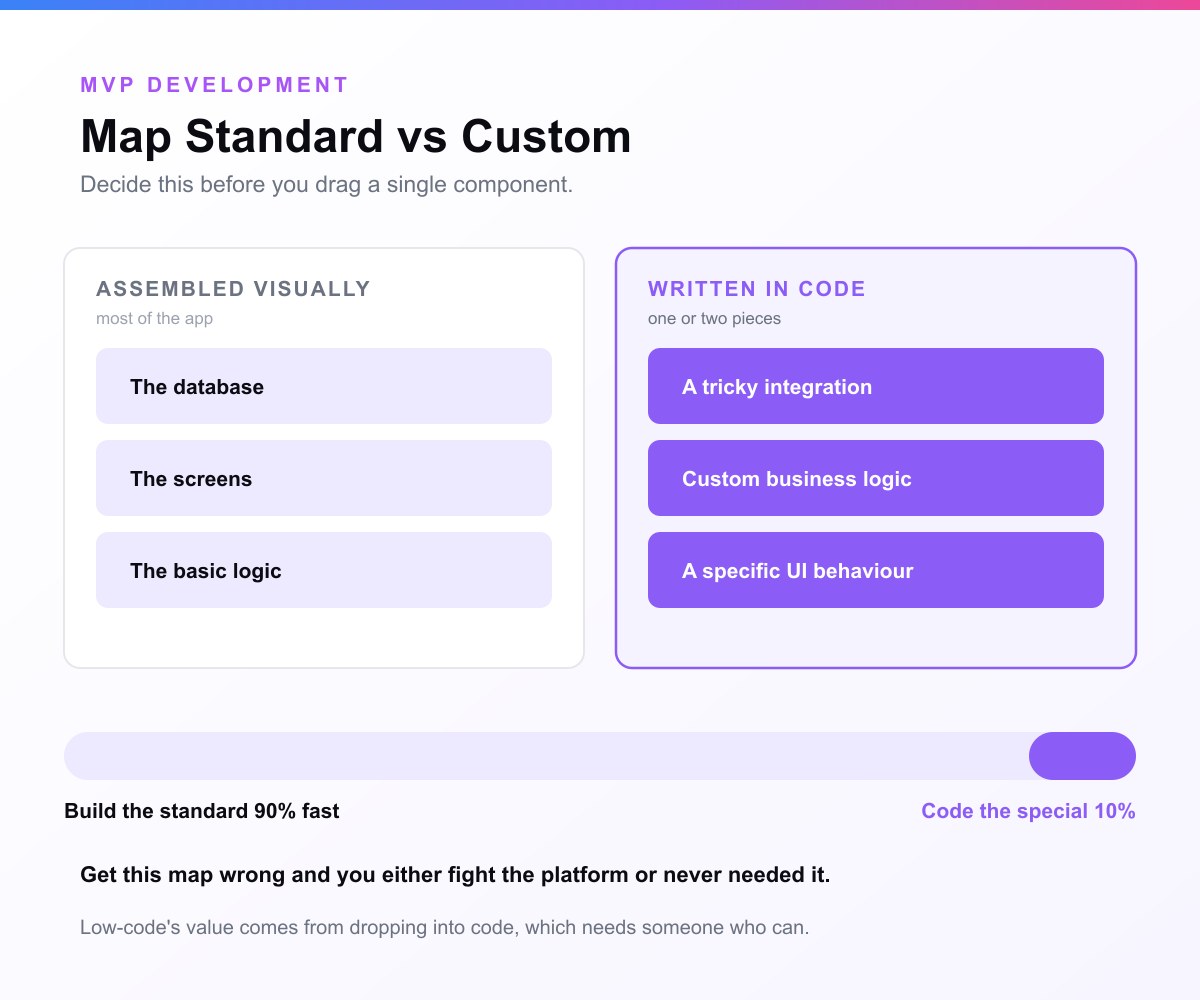
- Map standard vs custom. Decide which parts the platform can handle visually (most of them) and which one or two pieces need real code. This map is the heart of a low-code build.
- Build the standard parts visually. Assemble the database, screens, and basic logic on the platform, fast.
- Code the custom parts. Drop into real code for the integration, logic, or behavior the platform cannot do, the reason you chose low-code over no-code.
- Instrument and launch. Wire in analytics for activation and retention (see MVP metrics), deploy, and put it in front of real users.
The whole point is to get the speed of visual building for the bulk of the app while never being blocked by the platform's limits, because you can always write the code.
The low-code ceiling: when to go custom
Low-code raises the ceiling no-code has, but it does not remove it. There is still a point where a platform's structure fights you, and that is the signal to move to a fully custom build. You are likely there when:
- The custom code you are writing around the platform starts to outweigh what the platform gives you.
- Performance, scale, or reliability becomes the differentiator and the platform cannot keep up.
- You need total control over architecture, data, or security (common in regulated spaces like fintech or healthtech).
- Investor due diligence or a serious scaling plan requires fully owned, conventional code.
The good news is that a low-code MVP that proved the idea has done its job; migrating to custom after validation is a far better problem than building custom before knowing anyone wanted it. That migration is exactly what our scale your MVP work handles, turning a validated MVP into a production-grade product.
Security, compliance, and the production gap
This is the part of the no-code and AI-built story that gets glossed over, and it is the one that matters most once real users arrive. A tool that lets anyone build also lets anyone build something insecure without realizing it.
The risk is sharpest with AI-built apps. Independent studies have repeatedly found that a large share of AI-generated code carries security vulnerabilities, with some research putting it at the majority of generated applications having at least one exploitable flaw, and security vendors reporting that AI-written code is meaningfully more vulnerable than human-written code. The reason is simple: these tools optimize for something that works on screen, not for something that is safe under attack. They rarely add the automated tests, access controls, and input validation that real software needs.
No-code platforms are generally safer here because the vendor handles the underlying infrastructure, but they create a different gap. You inherit the platform's security posture and its compliance limits, which may not satisfy the requirements of a regulated industry. If you handle health data, financial data, or anything subject to strict regulation, a shared no-code platform often cannot give you the control and guarantees you are legally required to provide.
The takeaway is not fear, it is sequencing. Use no-code or AI builders to validate fast, but before the product carries sensitive data or real scale, have an engineer review it, or rebuild the core properly. The cost of a security review is trivial next to the cost of a breach.
Common mistakes that kill no-code MVPs
Most no-code MVPs do not fail because the tool was weak. They fail because of avoidable mistakes. Watch for these.
- Building too much. The biggest killer. Founders treat no-code's ease as permission to add features, and the MVP balloons into a slow, unfocused product that never ships. Build the one job.
- Skipping the data model. Diving into screens before structuring your data leads to a tangle that becomes impossible to extend. Model the data first, every time.
- No analytics. If you cannot see what users do, you are validating on opinion, not evidence. Instrument the one success action before launch.
- Choosing the wrong tool. Forcing a marketplace into a tool built for content, or a mobile app into a web-only builder, guarantees pain. Match the tool to the product shape.
- Staying on no-code too long. The opposite mistake: clinging to the platform well past the point where its ceilings are hurting real users and real revenue. Know the exit signals.
- Ignoring ownership from day one. If you might need to migrate later, favor tools that export code, and keep your data clean and exportable so a future move is a project, not a catastrophe.
Can you raise funding with a no-code MVP?
Yes. Investors do not fund your codebase, they fund evidence that you are solving a real problem for a real market. A no-code MVP with waitlists, active users, pilot results, or early revenue is a far stronger pitch than a polished custom app with no traction.
There is a caveat. Once you are raising to scale, investors do start caring about technical foundations, because they are betting on your ability to grow without rebuilding from scratch. Two things matter to them here: whether your product can scale on its current stack, and whether you actually own what you have built. A no-code MVP that you cannot export and do not control is fine for proving demand, but it becomes a question mark the moment the conversation turns to scaling. The clean story that lands with investors is: no-code proved the demand, here are the traction numbers, and here is the concrete plan to build the production-grade, fully owned version.
When to move from no-code to custom: the signals
The goal is to stay on no-code exactly as long as it is helping and not a day longer. For the other side of this decision, when to build with real code from the start, see our guide to the custom MVP. These are the signals it is time to move:
- You are hitting performance or database limits that slow real users down.
- You need a feature the platform architecturally cannot support.
- Compliance or security requirements have arrived that the platform cannot meet.
- Your team spends a large share of its time maintaining workarounds instead of shipping.
- Platform costs at your current scale now rival custom infrastructure.
- You have steady revenue, often a few thousand dollars of monthly recurring revenue, which means you have both the data and the justification to invest.
If two or more of these are true, you have outgrown the validation phase. The platform did its job. Now it is holding you back, and moving to a custom MVP build is the next step.
How to migrate from no-code to custom: a playbook
When you do move, plan for it as a real project, not a quick swap. A clean migration follows a predictable path.
- Audit what you have. Document every feature, workflow, and integration in the no-code app, and mark which ones real users actually use. The migration is also a chance to drop the dead weight.
- Export and map your data. Pull your data out of the platform's proprietary structure and design the clean database schema it should live in. This is almost always the hardest and most underestimated step, so budget real time for it.
- Re-architect for where you are going, not where you were. Build the custom version for the scale and features you now know you need, informed by everything real usage taught you. Do not just clone the no-code app.
- Run in parallel. Keep the no-code app live while the custom build comes together, so users are never stranded and you can compare behavior side by side.
- Cut over carefully. Migrate data, switch traffic, and watch closely. Plan the cutover for a low-traffic window and keep the old system available as a fallback until the new one is proven.
Done well, a migration is an upgrade rather than a fire drill: you keep your users, your data, and your learning, and you trade a ceiling for a foundation. This is exactly the kind of scoped, fixed-timeline work an experienced team can deliver without stalling your momentum.
Your no-code MVP launch checklist
Before you put your no-code MVP in front of real users, run this checklist.
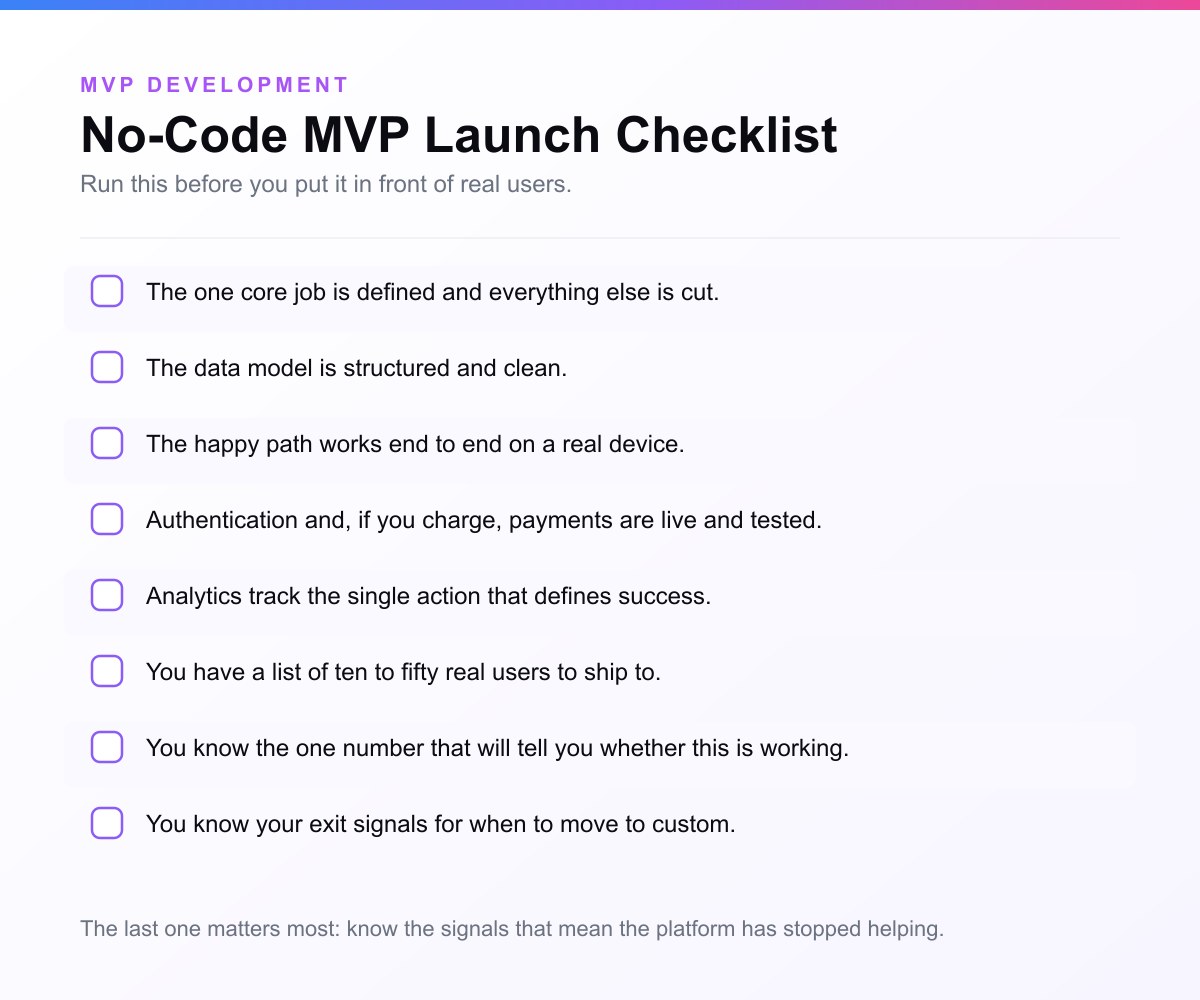
- The one core job is defined and everything else is cut.
- The data model is structured and clean.
- The happy path works end to end on a real device.
- Authentication and, if you charge, payments are live and tested.
- Analytics track the single action that defines success.
- You have a list of ten to fifty real users to ship to.
- You know the one number that will tell you whether this is working.
- You know your exit signals for when to move to custom.
A simple decision framework
If you are still unsure, run your idea through these questions:
- Is my main goal to prove demand cheaply and fast? If yes, lean no-code.
- Is the hard, valuable part of my product something no-code cannot do well? If yes, lean custom.
- Am I in a regulated or security-critical space? If yes, lean custom.
- Have I already validated demand and raised money to scale? If yes, lean custom.
- Do I need to own my code and avoid lock-in from the start? If yes, lean custom.
Most pre-validation founders should start with no-code. Most post-validation, funded founders should build custom. The hard cases in the middle are where an honest technical partner earns their keep.
Can you leave? We checked all 10 builders
Every article in this category tells you to “watch out for lock-in” and none of them say which tools actually lock you in. So we read the documentation for ten no-code and AI app builders on 23 September 2026 and recorded two things for each: whether it lets you export the source code at all, and whether what comes out is an application that runs without the vendor.
Across 10 no-code and AI app builders, MVP Development found that 6 offer code export and only 5 hand you an application that runs without them. Read 23 September 2026.
Four of the ten offer no code export of any kind: Bubble, Adalo, Glide and Softr. Bubble’s own documentation is the clearest statement of the position in the category: “Bubble apps can only be run on the Bubble platform; there’s no way of exporting your application as code.” You can take your data out as CSV, and that is all.
Adalo is the same answer in a different shape. You get compiled builds, an APK for Android and a TestFlight build for iOS, and no source. Glide has no source code to give you on any plan, enterprise included. Softr exports data and PDFs; code export is still an open feature request from its own community.
The split is not no-code versus code. It is AI builders versus everyone else.
Of 10 builders, all 4 AI builders in the sample — Lovable, Bolt, Replit and v0 — export a codebase that runs without them, and 0 of the 4 classic no-code builders export anything at all. Read 23 September 2026.
That is the finding that should change how you pick. Lovable syncs two ways with a GitHub repository you own, in React, Tailwind and Supabase. Replit exports standard uncompiled source with the full git history. Bolt gives you a ZIP that runs locally on Node. v0 gives you a Next.js project. None of these is a special format.
FlutterFlow is the one visual builder that behaves like an AI builder here: its CLI produces a complete Flutter project with native Android and iOS configuration, on paid plans only.
Webflow advertises code export and gives you a shell
Webflow is the trap, and the evidence is on Webflow’s own help page rather than in anyone’s opinion. The export gives you HTML, CSS, JavaScript and assets, and leaves behind everything that makes the site work:
“CMS, User Accounts, Ecommerce content (databases), code components and functionality, and localized pages, elements, and content aren’t included in exported code. On exported sites, Collection lists will show the empty state, and Collection pages won’t show any content that’s bound to Collection fields… site search and forms (including file upload and reCAPTCHA) will not work on exported sites.”
So a Webflow site with a CMS exports as a set of pages whose content is missing, whose forms are dead and whose search does nothing. It is a design artefact, not a product. There is a second catch underneath it: “Code export is only available on Workspace plans — that is, Site plans do not include the ability to export your site’s code.” The plan most people buy cannot export at all.
What this means when you are choosing
If there is any chance you will outgrow the tool, the export question is the only one that matters at signup, because it is the only decision you cannot reverse later. On Bubble, Adalo, Glide or Softr, migrating means rebuilding from scratch and re-importing your data by hand. On Lovable, Bolt, Replit, v0 or FlutterFlow, migrating means handing a developer a repository.
That is also the honest case for skipping the detour. If you already know the product needs custom logic, real integrations or an app store listing, the cheapest path is not the one that has to be rebuilt. Our MVP software development services exist for exactly the founder who has worked that out early.
The data, and how to cite it
The full dataset is published as JSON, one record per builder with the verbatim vendor quote and the source URL for every claim: no-code-export-2026-09-23.json. Every figure came from the vendor’s own documentation or an official staff answer in the vendor’s own forum, read by a person on 23 September 2026. No third-party review site was used.
To cite this study: MVP Development, “Can you leave? Code export across 10 no-code and AI app builders”, 23 September 2026, https://mvpdevelopment.company/blog/no-code-mvp.
Vendor terms change. Every figure above carries the date it was read, and the dataset will be re-read and re-dated rather than quietly edited.
Related guides
- What Is an MVP?: the full definition of a minimum viable product, and what makes one work
- MVP Examples: 15 Famous MVPs: see these MVP types in action at Airbnb, Dropbox, Uber, and more
- How to Build an MVP: the step-by-step process from idea to launch
- SaaS MVP: how to build and validate a software-as-a-service MVP
- AI MVP: building an MVP for an AI-powered product
- MVP Tech Stack: how to choose the right stack for your MVP
Frequently Asked Questions
What is a no-code MVP?
A no-code MVP is the first usable version of your product, built on visual platforms instead of hand-written code. It lets non-technical founders put a working app in front of real users in days, so they can validate demand before investing in custom development.
How much does a no-code MVP cost?
The tooling is cheap: most no-code platforms run from free up to roughly the cost of a modest monthly subscription, so a founder can often build and run a no-code MVP for well under a hundred dollars a month. The larger cost is your time, plus any specialist help you bring in. A custom build is a bigger investment, which is exactly why validating first with no-code makes sense.
What are the best no-code tools to build an MVP?
Bubble is the most powerful for logic-heavy web apps, FlutterFlow is the strongest for native mobile and lets you export source code, Webflow leads for marketing and content-driven sites, and Glide or Softr are fastest if your data already lives in a spreadsheet or Airtable. Pick by the shape of your product, not by popularity.
How long does it take to build a no-code MVP?
A tightly scoped no-code MVP can be live in days to a couple of weeks, depending on how complex your core flow is. The single biggest factor is discipline about scope: building only the one core job keeps the timeline short, while scope creep is what stretches a weekend project into a month.
Can a no-code MVP scale?
Up to a point. No-code platforms handle early growth well, but they have a performance and flexibility ceiling. As your users, data, and feature needs grow, you will eventually hit limits you cannot fully solve from inside the platform, which is the usual trigger to move to custom code.
What is the difference between no-code and low-code?
No-code is fully visual and requires no programming at all. Low-code is visual too, but it lets you drop into real code for the parts the platform cannot handle on its own. Low-code pushes the ceiling higher and is more flexible, but it assumes you have at least some engineering skill available.
Are AI app builders the same as no-code?
Not quite. No-code tools assemble an app from visual components, while AI app builders like Lovable, Bolt, and v0 generate actual code from a written prompt. AI builders are faster and you own the code, but that code is often insecure and hard to maintain, so it needs an engineering review before it is production-ready.
Can I build a marketplace or mobile app with no-code?
Yes to both, with caveats. Bubble can build a two-sided marketplace and FlutterFlow can build a native mobile app well enough to validate demand. The hard parts, marketplace trust and payment splits, or mobile push, offline, and app-store review, are where you should expect to invest real effort or eventually move to custom.
Do investors accept no-code MVPs?
Yes, for early validation. Investors care about traction far more than how the product was built. Once you are raising to scale, they will want to see that your product can grow and that you own your technology, so the strongest narrative pairs a validated no-code MVP with a clear plan for a production-grade custom build.
When should I switch from no-code to custom code?
Switch when no-code starts costing you more than it saves: performance limits hurting users, features the platform cannot support, compliance it cannot meet, a growing maintenance burden from workarounds, or steady revenue that justifies the investment. If you are fighting the tool more than you are shipping, it is time.
Can I migrate my no-code app to custom code later?
Yes, and many products do. Plan for it as a real project rather than a quick swap. Migrations commonly take months, and moving data out of a platform's proprietary structure is usually the hardest part. The upside is that you rebuild on a foundation you own, informed by everything you learned from real usage.
Is no-code or custom development better for my MVP?
Neither is universally better, it depends on your stage. If you are pre-validation, non-technical, or on a tight budget, no-code is usually the smarter start. If your core is technically complex, you are in a regulated field, or you have validated demand and funding to scale, custom development is the better foundation.
If you have validated your idea with no-code and you are ready for a production-grade version you fully own, that is exactly the handoff we specialize in. Custom MVP development at MVP Development turns a proven concept into an investor-ready product in 3-4 weeks, with full code ownership and a senior team. Tell us where your no-code build will break first and we will plan the graduation path off it.
What is a low-code MVP?
A low-code MVP is a minimum viable product built mostly on a visual, drag-and-drop platform but extended with custom code where the platform cannot do what you need. It sits between a no-code MVP (pure visual, fastest but capped) and a custom build (code from scratch, most flexible). The approach gives you much of no-code's speed while letting you write real code for the one or two pieces a no-code tool could not handle, so you do not hit a hard ceiling.
What is the difference between low-code and no-code for an MVP?
No-code builds the entire MVP inside a visual platform with no coding, which is faster and accessible to non-technical founders but limited to what the platform supports. Low-code builds visually too but lets you drop into custom code wherever the platform falls short, raising the ceiling at the cost of needing some engineering skill. Choose no-code if your logic is standard and you are non-technical; choose low-code if your product is mostly standard but has a few custom needs and you have a developer.
What are the best low-code platforms for an MVP?
Common low-code platforms for an MVP include OutSystems and Mendix (enterprise-grade, scalable), Retool (excellent for internal tools and dashboards), Bubble (no-code that extends into low-code via plugins and APIs for technical builders), and a managed backend like Supabase paired with a custom frontend. The best one is whichever handles your standard parts fastest and gives the cleanest escape into code for your custom parts. Pick for your specific core flow, not for the platform's reputation.
Can a low-code MVP scale?
A low-code MVP scales further than a no-code one, because you can replace or extend its limiting parts with custom code, but it still has a ceiling. When the custom code you write around the platform starts to outweigh what the platform provides, or when performance, security, or scale becomes the differentiator, it is time to move to a fully custom build. The smart play is to validate with low-code, then re-platform the parts that need it once you have traction, which is exactly what scaling a validated MVP is about.
Sources & references
- Railsware, no-code MVP: practitioner view on building without code
- Toptal, no-code MVP for startups: when no-code is and is not enough
- AIMultiple, vibe coding: research overview of AI-assisted building
- Eric Ries, The Lean Startup, validated learning and building for speed over premature scale
- Y Combinator, Startup Library, pragmatic advice on shipping early-stage products fast
- Stack Overflow Developer Survey, adoption of low-code and visual development tools
- Atlassian, Minimum Viable Product, the MVP in agile product development


