


TL;DR
Webflow is the best no-code platform for a content-led MVP, a polished marketing site, a landing-page validation, or a CMS-driven product, built and changed without code. Where Bubble is the no-code tool for app logic, Webflow is the no-code tool for beautifully designed, content-driven sites, and knowing which job you have is the whole decision.
The short case: Webflow gives you pixel-level design control, a real CMS, fast hosting, and the ability to ship a professional-looking product in days, ideal when your MVP is fundamentally a content or marketing experience rather than a logged-in application. This guide covers exactly what Webflow is great for, what it is not, how a Webflow MVP gets built, what it costs, and when to choose it over Bubble or custom, as a spoke of our no-code MVP and MVP tech stack guides.
Key Takeaways
- Webflow is the best no-code platform for a content-led MVP: a marketing site, a landing-page validation, or a CMS-driven product.
- Where Bubble is the no-code tool for app logic, Webflow is the no-code tool for beautifully designed, content-driven sites.
- It gives pixel-level design control, a real CMS, and fast hosting.
- It is ideal when your MVP is fundamentally a content or marketing experience rather than a logged-in application.
- Knowing whether you need app logic or a content site is the whole Bubble-vs-Webflow decision.
What kind of MVP is Webflow for?
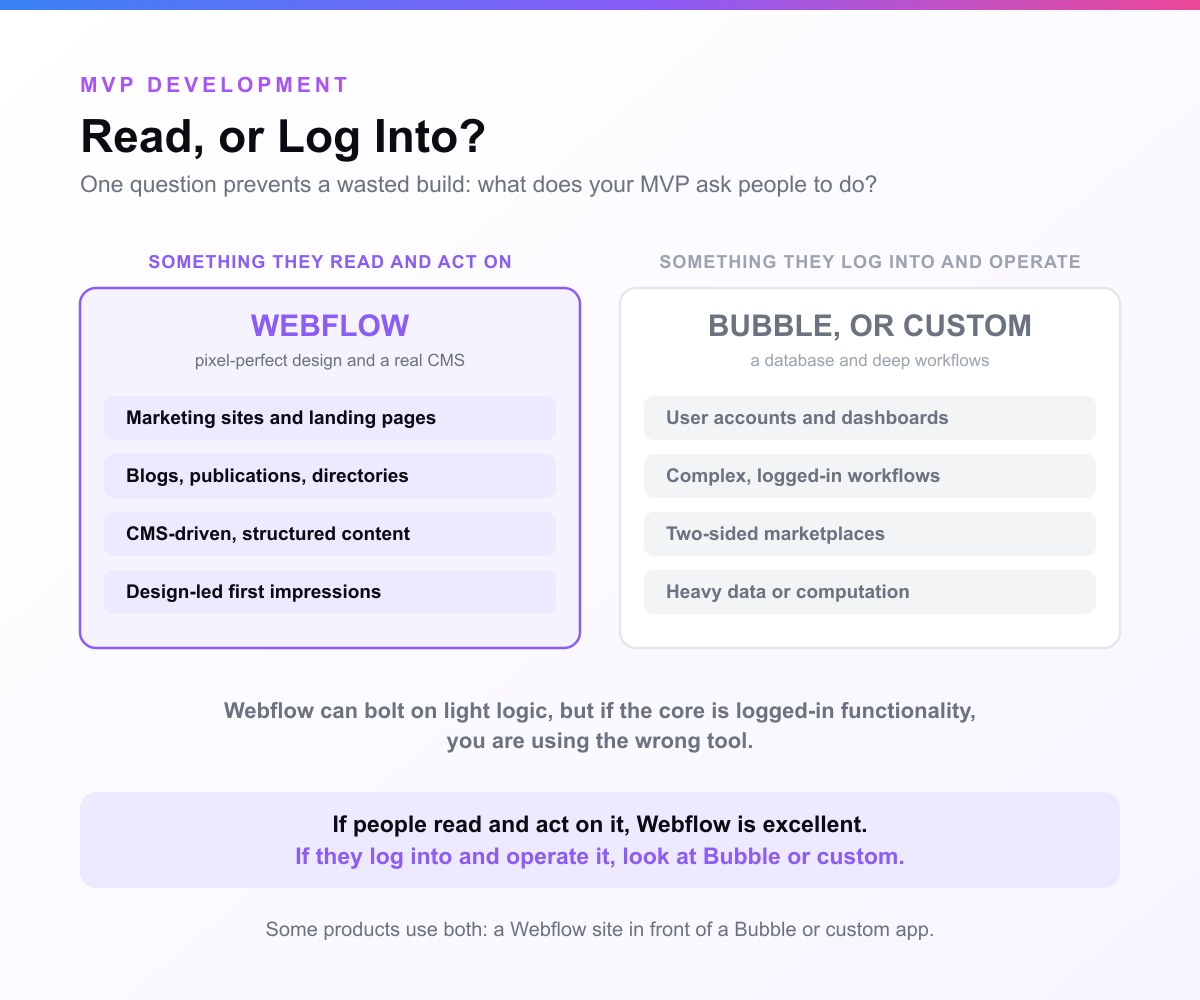
This is the question that prevents a wasted build, because Webflow and Bubble solve different problems.
Webflow is great for:
- Marketing-site and landing-page MVPs: the fastest way to validate demand is often a sharp page that explains the offer and captures sign-ups or pre-orders. Webflow makes that page look funded, not thrown together.
- Content-driven products: blogs, publications, directories, listing sites, and resource libraries built on Webflow's CMS.
- CMS-driven sites: anything where the core is structured content (a directory of X, a catalogue of Y) that you manage through collections.
- Brand and design-led first impressions: when looking credible is part of what you are testing, Webflow's design control wins.
Webflow is not the tool for:
- App-logic products: user accounts, dashboards, complex workflows, two-sided marketplaces. That is a Bubble job (or custom). Webflow can bolt on membership and light logic via add-ons, but if the core of your product is logged-in functionality, you are using the wrong tool.
- Native mobile apps: Webflow is web-only; mobile-native goes to React Native or Flutter.
- Heavy data or computation: anything performance- or algorithm-driven is a custom build.
The honest rule: if your MVP is something people read and act on, Webflow is excellent; if it is something people log into and operate, look at Bubble or custom. Picking by this distinction is how you avoid both thin validation and a tool that fights you.
Why Webflow fits a content-led MVP
- Professional design, fast. Webflow's visual designer gives real control over layout, typography, and interactions, so the MVP looks credible, which matters when first impressions are part of the test.
- A real CMS. Webflow Collections let you manage structured content (posts, listings, items) without code, the backbone of a directory or content product.
- Live in days. A founder or designer can build and publish a polished site fast, keeping the build-measure-learn loop tight.
- Fast, managed hosting. Webflow hosts the site on a fast CDN, so performance and reliability are handled for you.
- SEO-friendly. Clean markup, meta control, and fast load times make Webflow a strong base for content that needs to rank, useful when organic search is part of your validation.
How to build an MVP in Webflow
A Webflow MVP comes together in a clear sequence:
- Design the pages. In the Designer, you build responsive pages visually, with real control over the box model, flex/grid layouts, typography, and interactions/animations. This is where Webflow's edge over template builders shows.
- Model your content with the CMS. Create Collections (the equivalent of content types, e.g. Listing, Article, Resource) and bind them to dynamic pages, so one template renders every item. This is what turns a static site into a content product.
- Capture what you're validating. Add native forms for sign-ups, waitlists, or pre-orders, the data points that actually prove demand. Wire submissions to your email tool.
- Add light logic via integrations. For payments, memberships, or automation, connect tools like Stripe, Memberstack, and Zapier or Make. This extends Webflow without turning it into an app platform, and it is the line where, if you need much more, you should be on Bubble instead.
- Publish. One click pushes to Webflow's hosting on a custom domain.
The work is design and content modelling, not coding, which is why a credible content-led MVP can be live in days.
What a Webflow MVP costs
Webflow's cost is modest at the MVP stage and comes in two parts:
- The platform. Webflow has site plans (roughly entry-level per-month tiers, more for CMS and higher traffic) plus optional add-ons like Memberstack for membership or Zapier for automation. For a validation-stage content MVP, you are usually on a low plan, and hosting/CDN is included.
- The build. If you build it yourself, the cost is your time. A designer or Webflow agency can build a polished content-led MVP for a fraction of a custom build. For the full comparison across approaches, see how much it costs to build an MVP.
Webflow is cheap to validate on; its cost rises gently with CMS usage and traffic rather than spiking, which is one reason it suits content products well.
Real products built on Webflow
Webflow powers a huge range of professional marketing sites, content publications, and directories, including sites for well-known companies, precisely because it produces a polished, fast, SEO-friendly result without an engineering team. For founders, the pattern that matters is the validation play: ship a credible landing page or content/directory MVP on Webflow, prove that people sign up, read, or pre-order, and only then invest in building the deeper product. Many startups begin exactly this way, with a Webflow front to test the market before a line of app code is written.
Webflow vs Bubble for an MVP
These are the two most popular no-code platforms, and founders constantly confuse them. They are not competitors so much as tools for different jobs:
| Webflow | Bubble | |
|---|---|---|
| Best for | Content, marketing, landing pages, directories | Web apps with logic: SaaS, dashboards, marketplaces |
| Core strength | Pixel-perfect design + CMS | Database + workflows (app logic) |
| The product is something users… | Read and act on | Log into and operate |
| Logic/app features | Light, via integrations | Native and deep |
Choose Webflow when your MVP is fundamentally a designed, content-driven experience. Choose Bubble when the core is logged-in functionality.
Some products even use both, a Webflow marketing site in front of a Bubble (or custom) app, which is a perfectly good architecture. The MVP tech stack guide covers the full decision.
When to move beyond Webflow
Webflow stops being enough when your product grows from content into a real application, you need user accounts and complex logic at the core, deep data relationships, or features the platform's integrations can't reasonably support. At that point the content layer can often stay on Webflow while the app gets built on Bubble or custom code. As with any no-code start, hitting that ceiling is a sign of success: you validated cheaply, and now have the traction to justify the build.
Build your Webflow MVP with us
Webflow is the right call when your MVP is a polished, content-led experience, a marketing site, a landing-page validation, or a CMS-driven product, that needs to look credible and ship fast.
We build content-led MVPs on Webflow at MVP Development when that is the right tool for validating your idea, and when your product is really an app, we build it on Bubble or custom instead. The point is to put your idea on the right stack for the job, not to sell you one approach. Either way you get a funding-ready MVP in 3 to 4 weeks, on a fixed quote you approve before we start.
And when a Webflow MVP proves the market and you need the deeper product built, we are the team that builds it, by senior engineers, with full code ownership.
Explore web app MVP development, or see the wider no-code MVP and MVP tech stack guides.
Want your MVP built on Webflow (or as a full app)? Tell us what your Webflow site cannot do yet and we will scope the application behind it.
Related guides
- No-code MVP: the full no-code playbook and tool landscape
- Bubble MVP: the no-code tool for app logic (Webflow's counterpart)
- Landing page MVP: the validation technique Webflow is ideal for
- MVP tech stack: choosing the right approach overall
Frequently asked questions
Is Webflow good for building an MVP?
Yes, for the right kind of MVP. Webflow is the best no-code platform for content-led products, marketing sites, landing-page validations, content publications, directories, and CMS-driven sites, where you want a polished, credible result fast without engineers. It gives you pixel-level design control, a real CMS, and fast hosting. It is not the right tool if your MVP's core is app logic (user accounts, dashboards, complex workflows), that is a job for Bubble or custom code. So Webflow is excellent when your product is something users read and act on, and the wrong choice when it is something they log into and operate.
Webflow or Bubble for an MVP?
It depends on what your product fundamentally is. Use Webflow when your MVP is a designed, content-driven experience, a marketing site, landing page, directory, or content product. Use Bubble when the core is logged-in functionality with a database and workflows, like a SaaS tool or marketplace. The simplest test: if users mainly read and act on your product, Webflow; if they log in and operate it, Bubble. Some products sensibly use both, a Webflow marketing site in front of a Bubble or custom app, so it is not always either/or.
Can you build a web app in Webflow?
Only a limited one. Webflow is a design-and-CMS platform, not an app builder. You can add light functionality, memberships via Memberstack, payments via Stripe, automation via Zapier or Make, which is enough for a content site with a paywall or a simple members area. But if your product needs real application logic, complex user roles, dashboards, data-heavy workflows, you will fight the platform. For that, Bubble is the no-code answer and custom code is the scalable one. Use Webflow for the content and marketing layer, not as the engine of an app.
Can a Webflow MVP rank in search?
Yes, and that is one of its strengths. Webflow produces clean, fast, SEO-friendly sites with full control over meta tags, headings, URLs, and load speed, and its hosting runs on a fast CDN. For a content-led MVP where organic search is part of how you validate demand, a directory, a content product, a marketing site, that makes Webflow a strong base. You still have to do the SEO work (good content, structure, and links), but the platform does not get in your way the way some no-code tools do.
Sources & references
- Webflow: the no-code design and CMS platform
- Eric Ries, The Lean Startup: validating fast and cheap
- Atlassian, Minimum Viable Product: scoping the MVP
- Y Combinator Library: startup build and validation advice
The 3 to 4 week figure reflects MVP Development delivery data for tightly scoped builds.


