


TL;DR
MVP UX design is the practice of designing the smallest usable version of a product, the one core flow, mapped, wireframed, prototyped, and given a clean interface, so you can test whether it works with real users before building the full thing. It is design in service of validated learning rather than polish for its own sake. The hard part is not making it pretty; it is deciding what to leave out, then designing the one flow that remains so well that users can actually use it.
The key idea most teams get wrong: in an MVP, design is not the part you cut. The "viable" in minimum viable product is the user experience. If the core flow is confusing, people churn on the experience, not the idea, and you learn the wrong lesson. This guide covers what MVP UX design is, why it matters, the lean process from flow to UI, the principles that keep it focused, the mistakes that sink it, and how to design an MVP users actually want. For the underlying concept, start with what an MVP is.
Key Takeaways
- MVP UX design is designing the smallest usable version of a product: the one core flow, mapped, wireframed, prototyped, and given a clean interface.
- It is design in service of validated learning rather than polish for its own sake.
- The hard part is deciding what to leave out, then designing the one remaining flow so well that users can actually use it.
- In an MVP, design is not the part you cut: the "viable" in minimum viable product is the user experience.
- If the core flow is confusing, people churn on the experience, not the idea, and you learn the wrong lesson.
What is MVP UX design?
MVP UX design is designing the user experience and interface of a minimum viable product: the research, user flows, wireframes, prototype, and UI needed for the single core flow that proves your idea, and nothing more. It takes the lean principle behind the MVP, build the least you can to learn the most, and applies it to design.
In UX terms, an MVP is not a sketch, a mood board, or a pixel-perfect vision of the finished product. It is a real, usable design for one narrow slice of the product: the flow that answers your riskiest question. What does MVP mean in UX design? The same thing it means everywhere else, the minimum viable product, the smallest version that still delivers real value, expressed as an experience a real person can move through and get something out of.
The discipline sits at the intersection of two ideas. From product, it inherits ruthless scope: design only the core flow. From UX, it inherits a non-negotiable standard: that flow has to actually work for a real user. Hold both at once and you have MVP UX design, minimum scope, viable experience.
Why UX design matters in an MVP
There is a persistent myth that an MVP is the place to skimp on design, that you ship something ugly and bare, and add the UX "later." That myth is expensive, because it misreads what "minimum" refers to.
Minimum is about scope, not quality. You build fewer features, but the ones you build have to work, and "work" for a user means more than functioning code, it means an experience they can understand and complete. A checkout flow that runs perfectly but confuses people still fails. The MVP's entire purpose is to test whether people want and can use your solution; bad UX corrupts that test at the source.
Here is the trap in concrete terms. You ship an MVP with a confusing core flow. Users drop off. You read the data as "no demand" and pivot or quit, when the truth was "the idea was fine, the experience was broken." You have just made the most expensive possible decision, abandoning a good idea, on the basis of a usability failure you mistook for a market signal. Good MVP UX design is what keeps your experiment honest: it ensures that when users churn, they are reacting to the idea, not to a button they could not find.
There is a second reason design matters in an MVP: fundability. A deployed product with a credible, usable interface is what turns an investor conversation from "we think people will want this" into "look, they are using it." A polished-enough UI signals competence and makes the product feel real. You are not designing for a design award; you are designing enough that the product is believable to a user and an investor alike.
The core principle: minimum scope, viable experience
Every decision in MVP UX design comes back to one tension, and getting it right is the whole craft.
Push too far toward minimum and you ship an experience so bare it does not actually work, broken flows, missing feedback, no error states, and your test teaches you nothing true. Push too far toward viable and you over-design, polishing features and edge cases that have not earned the investment yet, blowing the time and budget the MVP was supposed to save.
The sweet spot is the smallest experience that a real user would find usable and worth using. That means the core flow is complete and reliable, the critical states (loading, empty, error, success) are handled, and the interface is clear, while everything outside that one flow is deferred, and the visual polish is "credible," not "final." A good rule: design the core flow to production quality, and let everything around it be obviously, intentionally minimal.
This is the same balance that defines the MVP itself, applied to experience. If you want the product-side version of this discipline, our guide on how to build an MVP covers scoping the build; this guide is its design counterpart.
Lean UX: the process behind MVP design
MVP UX design runs on lean UX, a way of working that mirrors the build-measure-learn loop the MVP is built on. Instead of producing a giant spec and a pixel-perfect design up front, lean UX treats design as a series of hypotheses you test cheaply and refine with evidence.
The loop looks like this. You start with an assumption about your user and their problem. You design the smallest experiment that tests it, often a flow, a wireframe, or a clickable prototype, not a finished UI. You put it in front of real users, measure how they respond, and learn whether the assumption held. Then you refine and repeat. The output is not "the design"; it is validated knowledge about what works, captured in a design that has earned each of its decisions.
Lean UX changes what "done" means. In a traditional process, design is done when it is polished and signed off. In lean UX, design is done when it has answered its question, when you know the core flow works because real people moved through it. That reframe is what keeps MVP design fast: you are not chasing perfection, you are chasing proof. It pairs naturally with MVP validation, which tests demand; lean UX tests usability, the other half of "viable."
How to scope the UX for an MVP
The single highest-leverage thing in MVP UX design is scope: deciding which one flow to design, and having the discipline to leave the rest out. Get this right and everything downstream is easier; get it wrong and no amount of beautiful UI will save the MVP.
Start from the riskiest assumption. What is the one thing that, if users do not do it, the whole idea fails? For a marketplace it might be "a buyer can find and book a provider." For a SaaS tool it might be "a user can connect their data and get a result." That single action, end to end, is your core flow. Everything that is not on the critical path to it, settings, profiles, admin, secondary features, edge cases, is out of scope for the MVP design.
Then map the flow as a sequence of steps a real user takes, from entry to the moment they get value (the "aha"). This flow map, not a feature list, is the foundation of the whole design. Designing around the flow rather than around a pile of screens is what keeps an MVP coherent: every screen earns its place by moving the user along the one path that matters.
A useful test for scope: can you describe the MVP's design in a single sentence of the form "a user can [do the one core thing]"? If your sentence needs an "and" and an "also" and a "plus," the scope is still too big. Cut until it fits.
A quick example makes the discipline concrete. Imagine a tool that helps freelancers invoice clients. The full vision has time tracking, expense reports, multi-currency, recurring invoices, client portals, and analytics. But the riskiest assumption is simply: will a freelancer create and send an invoice and actually get paid? So the MVP design scopes to exactly that, create an invoice, send it, mark it paid, and leaves everything else for later. Six features collapse into one flow. That is what scoping the UX looks like in practice, and it is almost always more aggressive than it first feels comfortable to be.
MVP UX design principles
A handful of principles keep MVP design focused and usable. Treat them as a checklist for whether what you are designing is genuinely an MVP experience or a full product in disguise.
- One core flow, designed well. Solve one job for one user, completely. Depth on the critical path beats breadth across features.
- Clarity over cleverness. The user should never wonder what to do next. In an MVP, an obvious, slightly boring interface beats a novel one that needs explaining.
- Lean on familiar patterns. Use conventions users already know, standard navigation, forms, and controls, so you spend your design budget on the core flow, not on teaching people a new interface.
- Design the real states. Loading, empty, error, and success states are not polish; they are where MVPs feel broken. Designing them is part of "viable."
- Make it credible, not final. Clean typography, consistent spacing, and a simple, coherent visual language are enough. Custom illustration and micro-interactions can wait.
- Responsive by default. Your first users will arrive on phones, tablets, and desktops. The core flow has to work on all of them.
- Instrument for learning. Design with the metrics in mind, where will you measure activation, drop-off, and completion? A design you cannot learn from is not finished. See MVP metrics.
The thread through all of these is intentionality. An MVP design is not what is left when you run out of time; it is a deliberate, scoped experience built to answer a question.
The MVP design process, step by step
Here is the practical sequence from a rough idea to a dev-ready design. It is deliberately lean, most MVP designs move through it in one to two weeks.
| Stage | What you do | Output |
|---|---|---|
| 1. Discover | Pin down the user, the problem, and the one core flow | A flow map and a clear scope |
| 2. Wireframe | Lay out the screens and structure in low fidelity | Wireframes for the core flow |
| 3. Prototype | Connect the screens into a clickable flow | An interactive prototype |
| 4. Test | Put the prototype in front of real users | Validated (or corrected) flow |
| 5. UI design | Apply a clean, credible visual layer + a starter system | The designed core flow |
| 6. Handoff | Organize files, specs, and assets for development | A dev-ready design package |
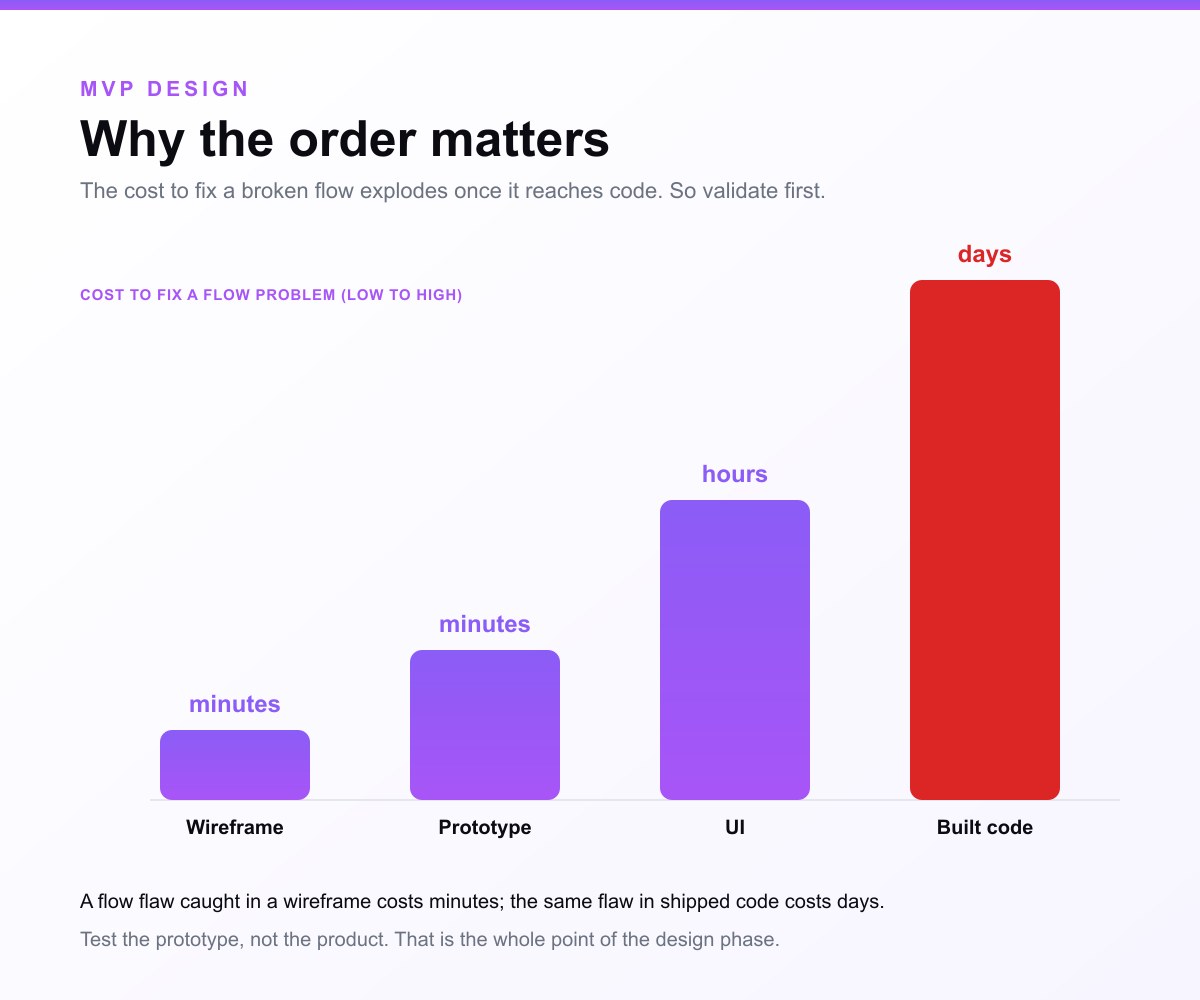
Discover is where scope is won or lost: you find the core flow and cut everything else. Wireframing locks structure and hierarchy cheaply, before any visual commitment, which is why it is the most cost-effective place to get the experience right. Prototyping turns wireframes into something clickable you can actually test, the cheapest way to catch flow problems before code. Testing, even informally with five users, surfaces the confusions you are blind to. UI design adds just enough polish to be credible and builds a small, reusable component system so v2 scales without a redesign. Handoff makes the design buildable, organized files and specs developers can work from directly.
Notice what is not in the process: months of high-fidelity mockups for features that have not been validated, exhaustive design systems, or pixel-pushing on screens outside the core flow. That restraint is the point.
Wireframes, prototypes, and UI: what each is for
These three get conflated constantly, and in MVP design the distinction matters because each tests a different thing at a different cost.
A wireframe is a low-fidelity layout, boxes and lines, no real visuals, that defines structure, hierarchy, and flow. It is cheap and fast, which makes it the right place to get the bones right before you invest in pixels. A prototype connects screens (often wireframes or UI) into a clickable flow you can move through; it tests the experience, whether the flow makes sense, before a line of code is written. The UI is the visual layer, type, color, components, that makes the product credible and usable.
In an MVP, you generally move wireframe → prototype → UI, validating cheaply at each step. A prototype is not the MVP itself, though, it is a design artifact for testing; the MVP is the real, working product that follows. This is also where MVP design touches the broader "is it the same as a prototype?" question, which we answer in full in MVP vs prototype: a prototype tests design, an MVP tests demand with a real, usable product.
Common MVP UX design mistakes
Most MVP designs fail in predictable ways. Avoiding these is half the battle.
Over-designing. The most common mistake: treating the MVP like a full product and designing every feature, screen, and edge case. It blows the timeline and the budget, and most of it is polish on things that have not been validated. Design the core flow well; leave the rest obviously minimal.
Polishing too early. Jumping to high-fidelity UI before the flow is validated means you pour hours into pixels on a structure that may be wrong. Wireframe and test the flow first; polish what survives.
Designing around screens, not flows. When you design a pile of screens instead of one coherent journey, the experience fragments. Map the flow first; let it dictate the screens.
Skipping user testing. "We know what users want" is the exact overconfidence the MVP exists to check. Five quick tests on a clickable prototype will surface confusions you cannot see yourself, for almost no cost.
Ignoring the unglamorous states. Empty, loading, and error states are where MVPs feel broken and where users actually churn. They are not optional polish; they are part of a viable experience.
Confusing minimal with low-quality. Minimal scope, never minimal craft on the core flow. A broken or confusing core experience teaches you nothing true, because users react to the flaw, not the idea.
How to test your MVP design with real users
Designing the core flow is only half of MVP UX design; testing it is the other half, and it is where lean UX earns its name. The good news is that meaningful usability testing is cheap and fast, you do not need a research lab or a big sample.
The classic finding from usability research is that about five users surface the large majority of the serious problems in a flow. You do not need fifty; you need five people who resemble your target user, a clickable prototype, and a few real tasks. Ask each person to complete the core flow, "sign up and create your first report," then watch where they hesitate, and resist the urge to explain. Their confusion is the data.
What to watch for: where people pause or backtrack, where they misread a label or a button, where they expect something that is not there, and where they simply give up. Each of those is a flow or interface problem you can fix in the prototype, for almost nothing, before it becomes an expensive code change. Test on the prototype, not the built product, because changing a prototype takes minutes and changing shipped code takes days.
Run this loop before you build, and again after launch with real usage data. Pre-launch testing catches the confusions you are blind to; post-launch metrics, activation and drop-off on the core flow, tell you whether the experience holds at scale. Both feed the same goal: a core flow so clear that when a user churns, it is the idea they are rejecting, not the interface.
Everything above is about testing the design: whether people can find the button, finish the flow, understand the screen. It is not the same as user research for an MVP, which asks whether they want the product at all and which methods actually tell you that. Do that work first; a usability test on a product nobody wants returns clean results about the wrong thing.
Tools for MVP UX design
You do not need a big stack. Most MVP design happens in one tool, Figma, which covers wireframing, UI design, prototyping, and dev handoff in one place, with components and a shared file your developers can inspect directly. For quick flow mapping, a simple diagram (even FigJam or a whiteboard) is enough. For lightweight user testing, an unmoderated tool or a few scheduled calls walking people through the prototype will do.
The tooling is not the hard part. The discipline is, deciding what to leave out, designing the real states, and testing the flow with actual users. A founder with Figma and scope discipline will out-design a big team with a sprawling toolchain and no focus.
MVP design across different product types
The principles are universal, but the core flow, and therefore the design focus, shifts with the kind of product you are building.
- SaaS MVPs live or die on the path from sign-up to first value, the "aha." The design priority is fast onboarding and one core workflow that delivers a result, not a dashboard full of features. See SaaS MVP development.
- Marketplace MVPs have two sides, so the core flow is the transaction loop, browse or list, match, and book or buy, plus the trust cues (reviews, profiles) that make strangers transact. Design the loop, defer the rest. See marketplace MVP development.
- Mobile MVPs are won on day-7 retention, so the design priority is a frictionless first session and the one habit-forming loop, with native patterns and proper offline states. See mobile app MVP development.
- Web app MVPs start in the browser, so responsive design and fast, clear flows matter, and the credibility bar is high because users compare you to every other web app they use. See web app MVP development.
Across all of them the discipline is the same, find the one flow that proves the idea and design it well, but knowing which flow matters most for your product type is what keeps the design focused on what actually drives validation.
Do you need a design system for an MVP?
You need a starter design system, not a full one. A handful of reusable components, buttons, inputs, cards, a type scale, a small color palette, and consistent spacing, is enough to make the MVP look coherent and credible, and it pays off immediately: every screen you design after that is faster and more consistent.
What you do not need is an exhaustive, documented system with every variant, state, and token specified. That is a version-two investment, appropriate once the product has proven demand and the team is scaling. Building it during the MVP is a classic over-design trap, you spend the design budget on infrastructure for features that may never ship.
The right move is a lean component set that covers the core flow and is built to extend. Designed that way, the MVP looks polished enough to be fundable, and version two grows the system instead of replacing it, the design equivalent of architecting code so it scales rather than getting rewritten.
MVP UX design vs full product design
It helps to be explicit about how MVP UX design differs from designing a full product, because the instinct to do "real" design pulls teams toward the full version too early.
Full product design covers the complete feature set: every flow, deep edge cases, extensive states, rich micro-interactions, a comprehensive design system, and the polish that makes a mature product feel refined. It assumes the product direction is known and worth investing in heavily, which is true after you have product-market fit.
MVP UX design is the opposite posture. It covers one core flow, handles the critical states but not every edge case, leans on familiar patterns instead of bespoke interactions, builds a starter component set rather than a full system, and aims for "credible" rather than "final." It assumes the direction is still a hypothesis, so it spends as little as possible to test it.
| MVP UX design | Full product design | |
|---|---|---|
| Scope | One core flow | Every feature and flow |
| States | Critical states only | All states and edge cases |
| Visual polish | Credible | Final and refined |
| Design system | Starter set | Comprehensive |
| Goal | Validate the idea | Scale a proven product |
The mistake is doing full product design for an unvalidated idea, which spends the budget polishing flows users may never want. The right sequence is MVP design first to validate, then full product design once the idea has earned it. Designing the full product up front is, in design terms, the same error as building it up front, the exact thing the MVP exists to prevent.
MVP design examples: lean experiences that worked
The most-cited MVP stories are also design lessons, because each shipped the smallest experience that could prove the idea.
- Dropbox designed a three-minute explainer video, not a product, as the experience that tested demand. The "design" was the narrative and the clarity of the promise, and the waitlist jumped from 5,000 to 75,000 overnight.
- Airbnb ran a manual, concierge experience, the founders hosting guests on air mattresses, designing the interaction (book, stay, pay) by hand before any interface existed.
- Buffer designed a two-screen flow, a landing page and a pricing page behind a button, to test whether people would pay, the entire UX scoped to one question.
The pattern: each designed only the experience needed to answer its riskiest question, and nothing more. See more in our MVP examples guide. The lesson for UX is that "design" in an MVP means the smallest experience that tests the idea, which is sometimes a single screen, sometimes a video, and sometimes one well-built flow.
Where MVP design fits: validate, design, build
MVP UX design is one step in a sequence, and knowing the order keeps you from doing it at the wrong time. First, validate demand, confirm people want this at all, which is cheaper than designing anything; our MVP validation guide covers it. Then design the MVP, scope the core flow, wireframe, prototype, test, and produce a dev-ready UI. Then build, turn the validated design into a real, working product.
Designing before validating risks polishing an experience for an idea no one wants. Building before designing risks engineering a confusing flow you then have to rip out. The sequence, validate, design, build, is what gets you to a usable, fundable MVP without wasted motion. It is also why the benefits of building an MVP, covered in the benefits of an MVP, depend on doing the design step well: a validated idea with a broken experience still fails.
Design your MVP with a team that keeps it lean
Knowing the principles and actually shipping a usable, scoped MVP design are different things. The hard part is the discipline, cutting to one core flow, designing the real states, resisting the urge to polish what has not been proven. That is exactly what we do.
- We scope to the one core flow. We find the flow that proves your idea and design it well, instead of spreading thin across features that have not earned the investment.
- We design to validate. Wireframes, a clickable prototype to test with real users, and a clean, credible UI, so the MVP is usable and fundable, not just functional.
- We hand off dev-ready, or build it. Take the files and build with your team, or have us ship the full, investor-ready MVP in 3 to 4 weeks. You own all the design either way.
Explore our MVP UX/UI design service, or if you are not sure what to build yet, start with a free MVP consultation.
Have an idea worth designing? Walk us through your riskiest screen and we will show you how we would make it convert.
Related guides
- What is an MVP?, the definition, types, and examples
- How to build an MVP, the build process
- MVP validation, confirming demand before you design
- MVP vs prototype, what each tests and when to use it
- The benefits of an MVP, why building one first pays off
Frequently asked questions
What is MVP in UX design?
In UX design, an MVP (minimum viable product) is the smallest usable version of a product's experience, the one core flow, designed and built well enough that real users can complete it and get value. It is not a sketch or a mockup; it is a real, usable design scoped to a single flow, created to test whether the idea works before designing and building the full product. The "minimum" refers to scope, the number of features and flows, while the experience for that one flow has to be genuinely usable.
What does MVP mean in UX design?
MVP stands for minimum viable product. In UX design it means designing only the experience needed to deliver the core value and validate the idea: the core user flow, its wireframes, a clickable prototype, and a clean interface, while deliberately leaving out secondary features, edge cases, and polish that have not been validated yet. The goal is validated learning about whether people can and will use your solution, with the least design effort.
Is UX design part of an MVP, or do you skip it for an MVP?
UX design is essential to an MVP, not something you skip. "Minimum" refers to scope, not quality: you design fewer flows, but the core flow has to be genuinely usable, because the MVP exists to test whether people want and can use your solution. A confusing experience makes users churn on the interface rather than the idea, which corrupts the test. You scope the UX down to one flow, but you design that flow well.
What is the difference between MVP UX and UI?
UX (user experience) is the overall flow and usability, how a user moves through the product and whether it makes sense; UI (user interface) is the visual layer, the type, color, components, and screens. In an MVP, UX comes first: you map and validate the core flow (UX) before applying a clean, credible visual design (UI). Both matter, but getting the flow right is higher-leverage than polishing pixels, which is why MVP design wireframes and tests the experience before designing the interface.
How long does MVP UX design take?
A scoped MVP design, one core flow from research and wireframes to a clickable prototype and dev-ready UI, typically takes one to two weeks, depending on the number of screens and the fidelity needed. It stays fast because it is deliberately lean: you design and validate the single core flow rather than the full product, and you keep visual polish to "credible" rather than "final." Heavier flows or more screens take longer, but the scope discipline is what keeps MVP design measured in weeks, not months.
Do I need a designer to build an MVP?
Not always, but good UX is non-negotiable. For very simple MVPs, component libraries and design systems (like established UI kits) can give a non-designer a credible interface. But for anything with a real core flow, a designer, or a design-literate team, dramatically improves the odds that users can actually use the product, which is the whole point of the MVP. If you have developers but no designer, an MVP design service or a focused design phase is often the highest-leverage investment you can make before building.
What makes a good MVP design?
A good MVP design is focused (one core flow, not many), usable (the flow works clearly for a real user, including the loading, empty, and error states), credible (a clean, coherent interface that makes the product feel real and fundable), minimal (only the screens the core flow needs), and testable (instrumented so you can measure activation and drop-off). The balance that matters most is minimal scope with a viable experience: few flows, but the one you design has to genuinely work.
Should you design or build an MVP first?
Design first, then build, but validate demand before either. The sequence is validate, design, build: confirm people want the idea, design and test the core flow with a clickable prototype, then build the validated design into a real product. Designing before validating risks polishing an experience for an idea no one wants; building before designing risks engineering a confusing flow you then have to rip out. Designing and testing first is far cheaper than discovering flow problems in shipped code.
Can you do MVP UX design without code?
Yes, and you often should. The design phase, user flows, wireframes, a clickable prototype, and UI, happens entirely in design tools before any code is written, which is the point: you validate the experience cheaply first. A clickable prototype lets you test the core flow with real users without building it, so you catch flow problems when they cost minutes to fix rather than days. Code comes after the design is validated, when you build the real product from the dev-ready files.
Sources & references
This guide draws on established lean-startup and UX practice:
- Eric Ries, The Lean Startup, validated learning and the build-measure-learn loop behind lean UX
- Nielsen Norman Group, Minimum Viable Product (MVP), the UX perspective on what "minimum viable" means
- Interaction Design Foundation, Minimum Viable Product, MVP in the context of UX and product design
- Figma, What Is a Minimum Viable Product?, designing and prototyping an MVP
The one-to-two-week design figure reflects MVP Development delivery data for tightly scoped MVP designs.


