


TL;DR
A fake door MVP is a demand test where you put a real-looking entry point, a button, menu item, banner, or ad, for a feature that does not exist yet, then measure how many people try to use it. When someone clicks, they hit a "coming soon" message, usually with the option to leave their email. The click is the experiment. It proves whether real users want a specific feature badly enough to act, before you spend a single hour building it. It is also called a painted door test or a 404 test.
Where it fits: the fake door MVP sits in the demand-validation family with the landing page and crowdfunding approaches. The difference is scope and placement: a landing page pitches a whole product to new visitors, while a fake door tests one specific feature, usually inside a product real users already use. It is the sharpest tool for prioritizing what to build next. At MVP Development we help teams design honest fake door tests and then build the validated feature, often as a single-feature MVP shipped funding-ready in 3 to 4 weeks. This is the full playbook: how it works, the placements, the steps, the ethics, and the famous examples. It is one of the eight types of MVP in our wider map.
Key Takeaways
- A fake door MVP puts a real-looking entry point for a feature that does not exist yet, then measures how many people try to use it.
- The click is the experiment: it proves whether users want a specific feature before you build it.
- It is also called a painted door test or a 404 test.
- It sits in the demand-validation family with the landing page and crowdfunding approaches.
- Unlike a landing page, which pitches a whole product, a fake door tests one feature inside a product real users already use.
What is a fake door MVP?
A fake door MVP is a minimum viable product technique where you create the appearance of a feature, a door, that leads nowhere yet. You build only the entry point: the button, the link, the menu option, the pricing tier, or the ad that promises the feature. Behind it, instead of a working feature, there is a short message: "This feature is coming soon. Want us to notify you?" The number of people who open that door is your demand signal.
The logic is the same smoke test logic behind a landing page MVP, where there is smoke (clicks) there is probably fire (demand), but applied at the level of a single feature rather than a whole product. You are not asking users whether they would like a feature. You are watching whether they reach for it when it appears to exist. That behavioral signal is far more trustworthy than a survey, because clicking takes a small but real effort and reveals genuine intent in the moment.
The term has several names. Product managers call it a painted door test, because the door is painted on the wall: it looks real, but there is nothing behind it. Some teams call it a 404 test, because the click historically led to a dead end. The mechanics are identical. You fake the front of a feature, measure the interest, and only build the real thing if enough people want in.
A fake door MVP validates one thing precisely: that a specific feature has enough demand to be worth building. It does not tell you whether your eventual implementation will be good, whether users will keep using the feature, or whether it will move your business metrics. It answers the question that comes before all of those: should we build this at all? For a team drowning in feature requests and roadmap debates, that is often the most valuable question there is.
Fake door MVP vs landing page MVP (and the other demand tests)
The fake door is closest to the landing page MVP, and the two are frequently confused. The distinction is worth getting exactly right, because it changes when you reach for each one.
| Dimension | Fake door MVP | Landing page MVP |
|---|---|---|
| What it tests | Demand for one specific feature | Demand for a whole product or idea |
| Where it lives | Inside an existing product, app, or ad | On a dedicated standalone page |
| Who sees it | Your existing users, in their normal flow | New, acquired, or cold traffic |
| Best for | Prioritizing the roadmap of a live product | Validating a brand-new product before building |
| The action | A click on a feature that is not there | A signup for a product that is not there |
In short: a landing page MVP is how you validate a new product before it exists, by pitching the whole thing to people you bring to a page. A fake door MVP is how you decide what to build next in a product that already exists, by placing a fake feature in the path of people who already use it. They overlap in mechanism (both measure click or signup intent against a thing that is not built) but differ in scope and audience.
The other demand-validation sibling, the crowdfunding MVP, raises the stakes from a click to a payment: people back a product with real money before it exists. That gives the strongest demand signal of the three, but it is slower and far more involved to run. We cover it in the types of MVP guide.
And the demand-validation family as a whole differs from the manual-validation types. A concierge MVP and a Wizard of Oz MVP deliver a service by hand to learn how to build it and whether people will use it. A fake door does not deliver anything; it only measures whether people want the door opened. That is why the fake door usually comes first, to decide what is worth building, and the manual types come next, to learn how to build it.
When to use a fake door MVP
A fake door MVP is at its best when you have a live product and too many things you could build. Use it when:
- You are prioritizing a roadmap. You have ten feature ideas and the budget to build two. Put fake doors in front of all ten and let real click data, not the loudest stakeholder, decide which two.
- A feature is expensive or risky to build. If a feature would take weeks of engineering, an integration, or a new subsystem, a fake door is cheap insurance against building something nobody opens.
- You want to test demand among real users, in context. Existing users clicking a feature inside their normal workflow is a more realistic signal than strangers reacting to a pitch.
- You need to settle an internal debate with data. Fake doors turn "I think users want X" into a measured click-through rate that ends the argument.
- You are testing willingness to pay for an upgrade. A fake "Pro" tier or a fake premium feature, with a click leading to "coming soon," measures appetite for paying more.
It is the wrong tool in a few cases. If you do not yet have a product or any traffic, you have nowhere to place the door, so a landing page MVP is the right starting point instead. If the feature is trivial to build, it is often faster to just ship it behind a flag to a small group and measure real usage. And if your user base is tiny or relationships are fragile (early enterprise customers, for instance), a fake door can erode trust faster than it teaches you anything, so a direct conversation is wiser. The fake door earns its keep when you have enough users that a small, honest test produces a clear signal without damaging the relationship.
The anatomy of a fake door: where the door goes
A fake door is just a believable entry point plus a graceful dead end. The entry point can live in several places, and where you put it shapes what the signal means.
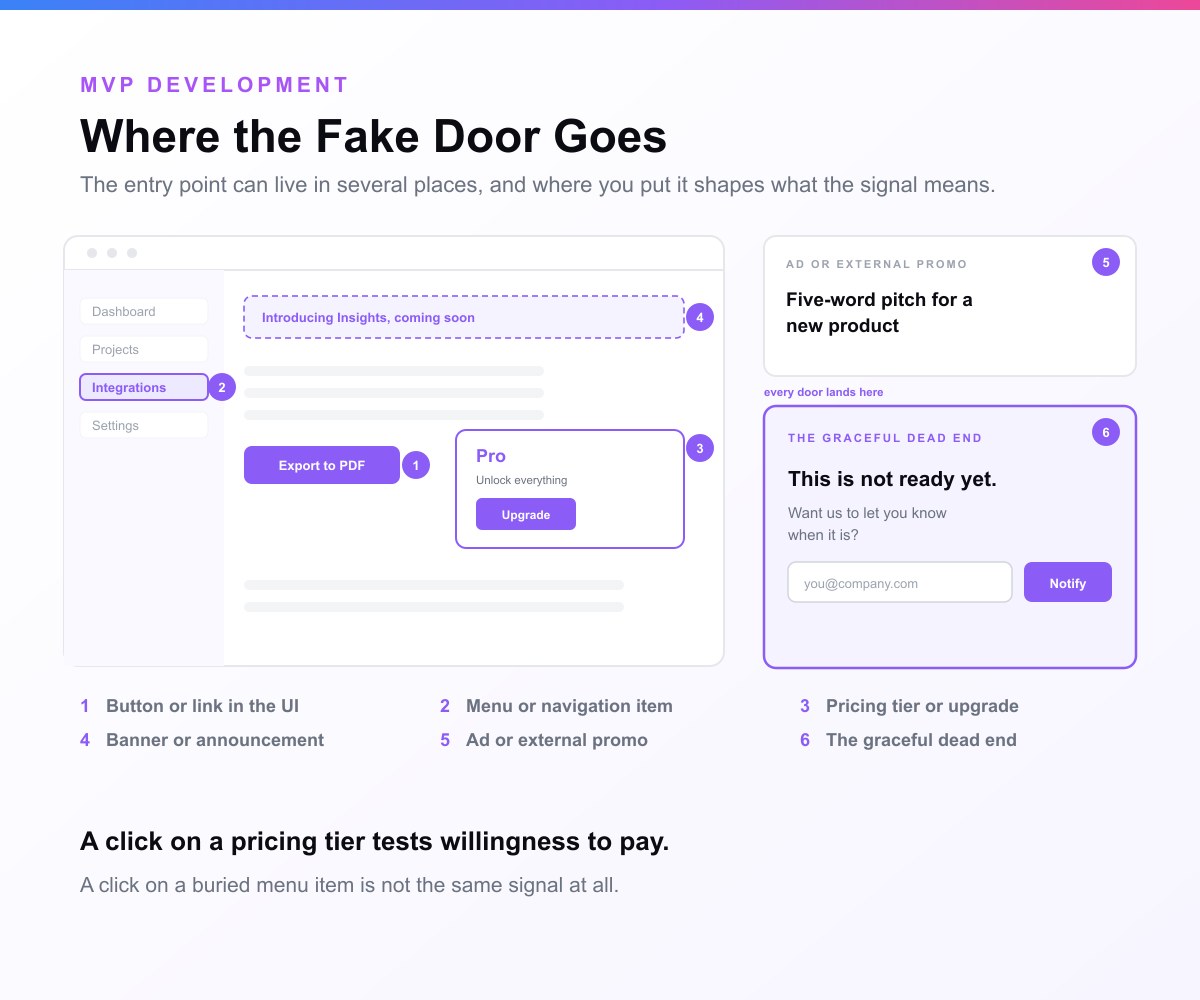
- A button or link in the UI. The most common form: a "Export to PDF," "Connect Slack," or "Try the new dashboard" button that does not work yet. Clicks measure feature appetite in context.
- A menu or navigation item. A new item in the sidebar or settings menu. Clicking reveals demand for a whole area of functionality.
- A pricing tier or upgrade prompt. A "Pro" plan or a locked premium feature with an "Upgrade" call to action. This tests willingness to pay, not just interest.
- A banner or announcement. "Introducing X, coming soon, get early access." Higher visibility, but also higher risk of feeling like a tease if overused.
- An ad or external promo. Zynga's classic version: a five-word pitch for a new product as a promo link, where the click-through decides what gets funded.
- A graceful dead end. Whatever the door, the moment behind it matters most. A good fake door lands on an honest message: "This is not ready yet. Want us to let you know when it is?" with an email capture. That turns a dead end into a list of people to build for, and keeps the test honest.
The craft of a fake door is in that landing moment. Done well, the user feels informed and invited, not tricked. Done badly, they feel cheated. The difference is almost entirely in the honesty and tone of the "coming soon" screen.
How to run a fake door test: a step-by-step playbook
A fake door test is fast to run, but a sloppy one produces misleading data or annoyed users. Here is the disciplined version.
Step 1: State the decision the test will make
Write down the exact decision this test informs: "If more than X percent of users who see this click it, we build the feature." A fake door without a predefined threshold becomes a number you rationalize after the fact. Decide first.
Step 2: Design a believable door
Make the entry point look like a real part of the product: correct styling, sensible placement, copy that matches your voice. If the door looks fake, low clicks might mean "it looked broken," not "no demand." The door has to be convincing enough that a click means real intent.
Step 3: Write an honest dead end
Design the "coming soon" screen before you launch. Be transparent that the feature is in development, thank the user, and offer to notify them. This screen is your ethics safeguard and your list-builder in one. Never leave a real 404 or a silent failure.
Step 4: Limit and segment the exposure
Show the door to a slice of users, often 1 to 10 percent, or to a beta or opt-in group, rather than your whole base. This caps any frustration while still producing enough data, and opt-in users expect experiments. Note which segment saw it, because demand can vary sharply by user type.
Step 5: Instrument the funnel
Track three things: how many users saw the door (impressions), how many clicked it (the demand signal), and how many left their email on the dead end (stronger intent). The click-through rate is your headline metric; the email rate is the higher-commitment confirmation.
Step 6: Run it long enough, then read it against a threshold
Let the test run until you have a meaningful sample across your segment, then compare the click-through rate to the threshold you set in Step 1 and to your own baseline for feature engagement. Interpret it relative to where the door sits: a button in a high-traffic flow and a buried menu item are not comparable.
Step 7: Close the loop honestly
Remove the door after the test, or replace it with the real feature if you are building it. Email the people who raised their hand, either to bring them into the build or to thank them and explain. How you close the loop determines whether the next test still works, because trust is the resource you are spending.
The fake door toolkit
You rarely need engineering to run a fake door, because the whole point is to avoid building the feature. A typical stack:
- Feature-flag and experiment tools: LaunchDarkly, PostHog, Optimizely, AB Tasty, or VWO let you show a door to a percentage of users and measure clicks without a deploy.
- In-app messaging and onboarding tools: Chameleon, Appcues, or Pendo can inject a button, banner, or tooltip that acts as the door, then show the "coming soon" message on click.
- Analytics: Amplitude, Mixpanel, PostHog, or GA4 to capture impressions, clicks, and the funnel to email capture.
- Email and waitlist capture: any list tool (Mailchimp, ConvertKit, a waitlist service) to collect the people who clicked through.
- Ad platforms: for external fake doors (Zynga-style), the ad network's own click-through reporting is the measurement.
The toolkit exists so a product manager or designer can launch a fake door in an afternoon. If you find yourself writing significant code to run the test, you have probably over-built the door.
What to measure, and what "validated" looks like
The headline metric is the click-through rate: of the users who saw the door, how many opened it. But like any demand test, the number only means something in context.
A few principles keep the read honest:
- Compare against a baseline, not an absolute. A 4 percent click-through on a new feature button can be strong or weak depending on where it sits and how your existing features perform. Anchor it to comparable elements in your product, and to the threshold you set before launching.
- Weight the higher-commitment action. A click is good; leaving an email on the "coming soon" screen is better, because it costs the user more. A modest click-through with a high email-capture rate is a stronger signal than a high click-through where nobody leaves their address.
- Mind the novelty effect. People click new things partly because they are new. A spike on day one can fade. Run long enough to see whether interest holds, and be skeptical of a signal that is all curiosity.
- Segment the result. Demand often concentrates in one user type. A feature that 15 percent of power users want and 1 percent of casual users want is a real finding, but only if you looked at the segments rather than the blended average.
- Remember what it does not prove. Clicks measure interest, not satisfaction. A strong fake door result says "build this," not "this exact design will delight users." You still have to build it well.
"Validated" looks like a click-through that clears your predefined threshold, holds beyond the novelty window, concentrates in a segment you can serve, and is confirmed by people leaving their emails to be notified. That combination is a green light to build.
The ethics of fake door testing
The fake door raises an ethics question that a landing page largely does not, because you are showing a fake feature to people who already trust your product. Handled carelessly, it shades into a dark pattern: deliberately deceiving users to manipulate behavior. Handled well, it is a transparent, short experiment that respects users. The line between them is worth taking seriously.
A fake door stays on the right side of that line when:
- The dead end is honest and immediate. The moment a user clicks, they learn the feature is not ready. You never let them believe it worked, never collect a payment for nothing, and never waste more than a click of their time.
- The exposure is small and bounded. Showing the door to 1 to 10 percent of users, or to an opt-in beta group, limits frustration. People who joined an early-access program expect experiments.
- You collect only what you need. An email to notify them, nothing more. The test is about understanding demand, not harvesting data.
- You remove the door and close the loop. You take the door down after the test, and you follow up with the people who raised their hand, either by building for them or by being honest that you are not.
- The stakes are low. Faking a "PDF export" button is very different from faking a "cancel my subscription" button or a safety-critical action. Keep fake doors to additive, low-risk features.
It crosses the line when the deception is sustained, when users are charged or harmed, when the same people hit fake door after fake door and lose trust, or when the "coming soon" is a lie because you never intend to build it. The simplest test: would your users, if they saw exactly how the experiment worked, feel respected or tricked? Design for "respected." A fake door spends user trust, and trust does not refill quickly, so spend it deliberately and sparingly.
Real fake door MVP examples
The technique is best understood through teams that used it to make real build-or-kill decisions.
Zynga's "ghetto testing"
Zynga, the social-gaming company, became famous for what its founder called ghetto testing. Before committing a development budget to a new game, the team would write a roughly five-word pitch for the concept and place it as a promo link inside their existing live games. They measured the click-through rate. Concepts that excited players got built; concepts that did not were killed before a single engineer touched them. It is the archetypal fake door: the door (the promo link) was real, the game behind it was not, and the clicks decided the roadmap.
Tesla's reservation deposits
When Tesla validated demand for a new vehicle before it existed, it ran a high-commitment version of the fake door: it invited customers to place a sizeable refundable deposit to reserve a build slot. The "door" was the reservation page; the product was years from delivery. The deposits were not just interest, they were money on the table, which made the demand signal far stronger than clicks. It shows the fake door scaling all the way up to willingness-to-pay validation for a physical product.
Polyvore's outfit sales
The styling site Polyvore wanted to know whether users would shop for whole outfits, and whether bigger discounts drove more buying. Rather than build the commerce system, the team faked the storefront and handled the payment and fulfillment behind the scenes by hand. It is a fake door that blurs into concierge territory, the front was faked, the back was manual, but the lesson is the same: validate the demand before building the machinery.
Everyday SaaS feature tests
Most fake doors are quiet and unglamorous. A B2B tool adds an "Integrations" menu item before any integrations exist, to see how many accounts click. A productivity app shows a fraction of users an "AI assistant" button that leads to a waitlist. A subscription product floats a "Pro" tier to gauge upgrade appetite. Each one turns a roadmap debate into a measured click, which is the entire value of the method.
Fake door MVPs and AI in 2026
AI features are the perfect candidate for fake door testing, and 2026 product teams lean on them heavily. AI capabilities are expensive and slow to build well: data pipelines, model selection, evaluation, guardrails. Before investing in all of that, teams float a fake "AI" door, an "Ask AI," "Summarize with AI," or "Generate" button, and measure how many users reach for it. The click-through tells them whether the AI feature is worth the substantial build, before they commit.
There is a natural pairing here. A fake door proves users want the AI feature; a Wizard of Oz test then proves you can deliver it, by having humans (often AI-assisted) produce the results behind an automated-looking front end. The fake door answers "do they want it?" and the Wizard of Oz answers "can we deliver it well enough?", and only then do you build the real model-backed feature. The ethics bar is higher for AI doors, because faking intelligence touches user expectations about the technology itself, so honesty on the dead-end screen matters even more.
Pros and cons of the fake door MVP
Pros:
- Extremely cheap and fast. You build only the door, not the feature, so a test runs in an afternoon.
- Tests real users in real context. Existing users in their normal flow give a more realistic signal than strangers on a pitch page.
- Settles roadmap debates with data. Click-through rates replace opinions about what users want.
- Tests willingness to pay. A fake tier or premium feature measures upgrade appetite, not just interest.
- Builds a warm list. The "coming soon" capture gives you the exact users to build for and launch to.
Cons:
- It spends user trust. Showing fake features to real users carries a real risk of frustration if done carelessly or too often.
- Clicks measure interest, not satisfaction. Demand for a door does not guarantee love for the built feature.
- Vulnerable to the novelty effect. New things get clicked because they are new; the signal can fade.
- Needs an existing audience. With no product and no users, there is nowhere to place the door.
- Easy to misread without segmentation. A blended average can hide where the real demand lives.
Common mistakes founders and teams make
- Leaving a real dead end. A click that hits a 404 or a silent failure feels broken and burns trust. Always land on an honest, friendly "coming soon."
- Exposing the whole user base. Showing a fake door to everyone maximizes both your data and your risk. Limit it to a small or opt-in segment.
- No predefined threshold. Without a number you committed to, any click-through becomes "promising." Decide what success means before launching.
- Ignoring the novelty effect. Reading a day-one spike as durable demand. Run long enough to see whether interest holds.
- Reading the blended average. Missing that the demand is concentrated in one segment, or absent in the segment you can actually serve.
- Running fake doors constantly. The same users hitting tease after tease will stop trusting your UI. Use the technique sparingly.
- Never closing the loop. Collecting emails and then going silent. The follow-up is what keeps the method usable next time.
Signs your fake door is working (and when to stop)
A fake door is delivering a clear answer when the click-through rate clears your predefined threshold, holds steady past the first novelty days, concentrates in a segment you can serve, and is backed by a healthy share of clickers leaving their email to be notified. When all four line up, you have a build decision you can defend.
Stop and rethink when the click-through stays at or below your baseline across a fair sample, when the only interest is a day-one spike that decays, or when the people who clicked vanish the moment you ask for an email. And stop running fake doors entirely, at least for a while, if you notice support complaints about "features that do not work" or a dip in trust metrics. The fake door is a scalpel, not a default. Used precisely and rarely, it is one of the most efficient validation tools there is. Used constantly, it quietly erodes the trust that makes your product work.
How to graduate from a fake door to a real feature
A validated fake door is a decision to build, made with evidence. The path forward:
- Talk to the people who knocked. Email the users who clicked and left their address. Ask what they expected the feature to do and why they wanted it. Their answers are your spec.
- Scope the smallest real version. Build the core of the feature that delivers what the door promised, not the gold-plated version. This is feature-level single-feature MVP thinking.
- Ship it to the people who clicked first. They are your warmest possible beta. Their real usage now tells you what the click could not: whether the feature satisfies once it exists.
- Measure real engagement, not just clicks. The fake door proved demand; now prove retention. If the built feature gets used and kept, you validated correctly. If it gets clicked once and abandoned, the demand was curiosity, and you learned something cheaply.
The discipline is to treat the fake door as the start of a build decision, not the end of validation. It tells you what to build; real usage tells you whether you built it well.
A worked example
Imagine a project-management SaaS with a steady user base and a recurring request, scattered across support tickets, for a time-tracking feature. Building real time tracking is weeks of work: timers, reports, integrations, billing implications. The team is unsure whether the loud requests represent broad demand or a vocal few.
So they run a fake door. They add a "Time tracking" item to the sidebar, styled exactly like the real navigation, shown to 10 percent of active accounts. Clicking it opens an honest panel: "Time tracking is coming soon. Want to be first to try it?" with an email field. They set the threshold in advance: above 8 percent of exposed users clicking, with a solid email-capture rate, means build.
Over two weeks, 12 percent of exposed users click, and the rate holds past the first few days rather than spiking and fading. Crucially, 40 percent of clickers leave their email, and the demand concentrates in agency-type accounts who bill by the hour, exactly the segment the team can serve. They email those users, learn that the core need is a simple timer plus an exportable weekly report (not the elaborate system they had imagined), and build that focused version first, shipping it to the clickers as the first cohort.
The team made a confident, evidence-backed build decision in two weeks, for the cost of a sidebar link and a panel, and discovered along the way that the feature could be far smaller than they feared. That is the fake door MVP working exactly as intended.
How MVP Development helps
Running a fake door is usually something a product team can do in-house, and we encourage it: it is the cheapest way to decide what is worth building before you commit engineering to it. Where we help is on either side of the test, designing it so the signal is honest and the trust cost is low, and building the validated feature once the door proves demand.
When a fake door (or a landing page test) confirms what to build, we ship the real thing: typically a single-feature MVP, built funding-ready in 3 to 4 weeks by senior engineers, scoped tightly around the need your test surfaced, on a clear, scoped quote you approve before we start. You build the feature your users already raised their hands for, to the users who raised them.
Proved demand with a fake door and ready to build the real feature? Name the feature you are tempted to fake first and we will design the test, and the build for when people knock.
What counts as enough demand, and why nobody agrees
The hardest part of a fake door test is not running it. It is deciding what the number means afterwards, and the advice on that is thinner than it looks.
Across 25 reachable articles telling founders how to run a fake door or painted door test, MVP Development found 9 state a threshold for what counts as enough demand. Read 24 September 2026.
Of those 9, one says where its number came from. The other eight state a bar with nothing behind it.
The one that cites a source misrepresents it. Swetrix presents “CTR above 10 to 15% in targeted segments” as guidance from Amplitude. Amplitude’s actual sentence is an example of how to phrase a hypothesis: “Enterprise customers will click ‘SSO integration’ at a 15% rate or higher.” An illustration, promoted to a benchmark by the only article that attributed anything.
The nine thresholds, side by side
They do not agree, and the spread is wide enough that the same result passes on one page and fails on another.
| Source | What it says clears the bar |
|---|---|
| helpmarq.com | Below 2% weak, 2 to 5% baseline, 5 to 15% promising, 15%+ strong |
| userintuition.ai | Above 5% strong, 2 to 5% moderate |
| userpilot.com | Around 5% for existing power users, 2 to 3% from cold traffic |
| swetrix.com | 2 to 5% typical in-product, 20 to 40% signup after the click |
| personizely.net | Minimum 3% CTR, or 50 email signups in one week |
| rocket.new | Around 5% CTR from the target audience |
| learningloop.io | At least 5% click, and 20% of those who click sign up |
| productspike.org | At least 5% of the user base willing to pay |
| launchingnext.com | At least 30 clicks and 10 email submits in 5 days |
Six of the nine land on 5%, so if you want the number fewest people argue with, that is it. The disagreement is at the edges: helpmarq calls 5% only the bottom of “promising” and reserves strong for 15%+, while userintuition calls anything above 5% strong outright.
The most useful entry in the sample states no threshold at all. Evelance argues that you write your bar down before launch and refuse to move it afterwards, and never says what the bar should be. On the check above that is a no. As advice it is better than most of the numbers, because a threshold you set after seeing the result is not a threshold.
What went wrong collecting this
The extractor was wrong on 23 of 49 extractions, 47%. A percentage sitting near a decision word is not a binary check, and it shows: compare 0% error on “does a mailto link exist” and 38% on the headline cost claim in an article.
It cannot tell a recommended bar from a number in a case study. It counted Buffer’s 5,000 signups from 2010, a Notino case study’s 3.5% CTR, an instruction to expose the test to 1% of traffic, and, best of all, one vendor’s claim of “98% participant satisfaction” on its own interview panel.
It also missed a threshold in a table. Helpmarq publishes the most specific framework in the whole sample as four table rows, and the paragraph-based extractor scored it zero. That was found by re-reading all 16 pages that returned nothing rather than trusting the zero, and it moved the answer from 8 to 9.
Four more pages could not be read at all: abtasty.com, uxknowledgebase.com, uxdesign.cc and crstanier.medium.com each returned HTTP 403. They are counted as unreachable rather than dropped, because dropping them would quietly improve the percentage.
Our own page is in the sample, measured by the same code, and it stated no threshold either. That is why this section exists.
How to cite these figures
Free to quote with attribution.
Across 25 articles telling founders how to run a fake door test, MVP Development found 9 state a threshold for what counts as enough demand, and 1 of those 9 says where its number came from (read 24 September 2026). https://mvpdevelopment.company/blog/fake-door-mvp
The dataset carries every threshold verbatim, every correction with its reason, and the four unreachable pages: fake-door-thresholds-2026-09-24.json.
Related guides
- What Is an MVP?: the full definition of a minimum viable product, and what makes one work
- MVP Examples: 15 Famous MVPs: see these MVP types in action at Airbnb, Dropbox, Uber, and more
- How to Build an MVP: the step-by-step process from idea to launch
Frequently asked questions
What is a fake door MVP?
A fake door MVP is a validation technique where you create a real-looking entry point, a button, link, menu item, or ad, for a feature that does not exist yet, then measure how many people try to use it. When someone clicks, they reach an honest "coming soon" message, often with an email signup. The click is the demand signal: it shows whether real users want the feature before you build it. It is also called a painted door test or a 404 test.
What is the difference between a fake door MVP and a landing page MVP?
Scope and placement. A landing page MVP pitches a whole product to new visitors on a dedicated page, to validate a brand-new idea before it exists. A fake door MVP tests demand for one specific feature, placed inside a product your existing users already use, to decide what to build next. The landing page validates a product; the fake door prioritizes a roadmap.
What is an example of a fake door test?
Zynga's "ghetto testing" is the classic example: the company placed a roughly five-word pitch for a new game as a promo link inside its existing games and measured the click-through, building only the concepts that excited players. Tesla ran a high-commitment version by taking refundable reservation deposits for a car before it existed. Everyday examples include a SaaS adding an "Integrations" menu item or an "AI assistant" button before either is built.
Is fake door testing ethical?
It can be, when done transparently and sparingly. It stays ethical when the dead-end screen is honest and immediate (the user learns at once that the feature is not ready), the exposure is limited to a small or opt-in group, you collect only an email to notify them, you remove the door afterward, and the feature is low-stakes. It becomes unethical, and shades into a dark pattern, when the deception is sustained, when users are charged or harmed, or when you never intend to build the thing. The test: would users feel respected or tricked if they saw how it worked?
What is a painted door test?
A painted door test is just another name for a fake door test. The metaphor is a door painted on a wall: it looks real, but there is nothing behind it. Product managers tend to use "painted door," lean-startup practitioners often say "fake door" or "404 test," but they all describe the same method of faking a feature's entry point to measure demand before building.
How do I measure a fake door test?
Track three numbers: impressions (how many users saw the door), clicks (the core demand signal, expressed as a click-through rate), and email captures on the "coming soon" screen (a higher-commitment confirmation). Compare the click-through rate to a threshold you set before launching and to comparable elements in your product. Watch for the novelty effect by running long enough to see whether interest holds, and segment the result, since demand often concentrates in one user type.
How much traffic or how many users do I need?
Enough that the click-through rate is stable rather than noise. Because a fake door usually lives inside an existing product, you need an active user base large enough that exposing a small slice (often 1 to 10 percent) still produces a clear signal. If you have very few users, or none yet, you do not have a place to put the door, and a landing page MVP is the better starting point.
Does a fake door test prove people will use the feature?
No. It proves interest, not satisfaction. A strong click-through says the feature is worth building; it does not promise that your particular implementation will be used and loved once it exists. That is why the next step after a successful fake door is to build the smallest real version and measure actual engagement and retention, which is the validation a click cannot give you.
How is a fake door used for AI features?
AI features are expensive to build well, so teams often float a fake "AI" door, an "Ask AI" or "Summarize" button leading to a waitlist, to measure demand before investing. It pairs naturally with a Wizard of Oz test: the fake door proves users want the AI outcome, then humans deliver that outcome behind the scenes to prove it can be done well, before the real model is built. The honesty bar on the dead-end screen is higher for AI, because faking intelligence touches expectations about the technology itself.
What comes after a successful fake door test?
You interview the users who clicked and left their email, turn their needs into a tight spec, and build the smallest real version of the feature, a single-feature MVP. You ship it first to the people who clicked, because they are your warmest beta, then measure real engagement and retention to confirm the demand was durable rather than mere curiosity. The fake door decides what to build; real usage confirms you built it well.
Where does the fake door MVP fit among the other MVP types?
It is one of the three demand-validation types, with the landing page and crowdfunding approaches, in the broader map of MVP types. Demand validation asks "do people want this?" Manual types like concierge and Wizard of Oz ask "can we deliver it, and will they use it?" Product types like the single-feature MVP ask "does the built feature get used?" The fake door is the sharpest demand tool for a product that already has users.
Sources and references
This guide draws on product-experimentation literature and documented company practices:
- Learning Loop, fake door testing definition, how it works, and pitfalls
- Optimizely, the painted door test mechanics and benefits
- Userpilot, fake door testing how to validate feature demand before building
- Curtis Stanier, a product manager's guide to painted-door tests practical and ethical guidance
- The Lean Startup the validated-learning and smoke-test principles behind the method


